> ## Documentation Index
> Fetch the complete documentation index at: https://docs.olostep.com/llms.txt
> Use this file to discover all available pages before exploring further.
# Willkommen bei Olostep
> Olostep: Infrastruktur für den zweiten Benutzer des Webs. Die beste Such-, Scraping- und Crawling-API für KI.
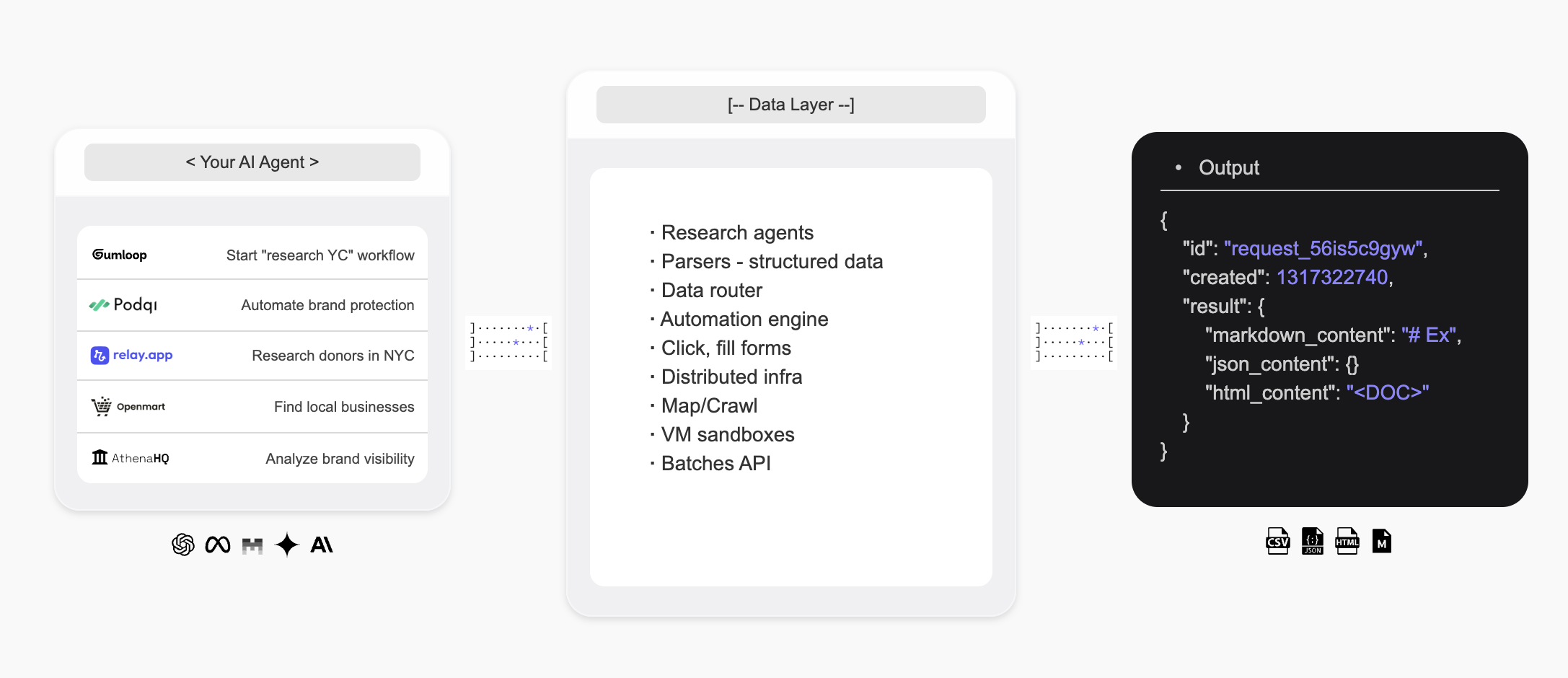
Olostep ist die Infrastruktur für den zweiten Benutzer des Webs — sie gibt KI-Agenten die Möglichkeit, das Web zu durchsuchen, strukturierte Daten in Echtzeit zu extrahieren und maßgeschneiderte Forschungsagenten zu erstellen.
 ## Einführung
* Die **Olostep API** ist die beste **Websuch-, Scraping-** und **Crawling-API** für KI, die von einigen der führenden Startups und Scale-ups weltweit genutzt wird.
* Der **Olostep Agent** ermöglicht die Automatisierung von **Forschungs-Workflows** auf eine No-Code-Weise mit nur einem Prompt in natürlicher Sprache.
**Für KI-Agenten:** Lade [docs.olostep.com/llms.txt](https://docs.olostep.com/llms.txt) herunter, um ein vollständiges Verzeichnis dieser Dokumentation zu erhalten, bevor du weiter erkundest oder [hier startest](https://www.olostep.com/agent-onboarding/SKILL.md).
## Verwende Olostep von deinem Terminal und KI-Agenten
Neben der API bietet Olostep ein CLI, einen MCP-Server und sofort einsatzbereite Skills, sodass jedes Tool — Claude Code, Cursor, Windsurf und mehr — das Web nativ nutzen kann.
`npm i -g olostep-cli` — scrape, map, crawl, beantworte und batch das Web von deinem Terminal aus. JSON-Ausgabe für Skripte, CI und Agenten.
Gib jedem MCP-Client (Claude, Cursor, VS Code) Live-Web-Tools. Gehosteter Endpunkt — keine Installation.
Sofort einsatzbereite Skills, die KI-Coding-Agenten lehren, wie und wann Olostep zu verwenden ist. Installiere mit `olostep add skills`.
## Was kann Olostep tun?
Ziehe jede URL als sauberes Markdown, HTML, Screenshots oder strukturiertes JSON.
Sammle rekursiv jede Seite auf einer Website, mit Filtern und Suche.
Erhalte KI-synthetisierte Antworten von Live-Webquellen, mit Zitaten.
### Warum Olostep?
* **Für KI gebaut**: Sauberes Markdown, strukturiertes JSON, Zitate — Ausgabe, die deine Agenten und Apps direkt konsumieren.
* **Zuverlässig im großen Maßstab**: Branchenführende Erfolgsrate; verarbeitet JavaScript, Anti-Bot und Proxys im Hintergrund.
* **Schnell**: Sub-Sekunden-Scrape; bis zu 10.000 URLs in einem Batch in 5–7 Minuten.
* **Kosteneffizient**: Deutlich günstiger als Alternativen im Produktionsmaßstab.
* **CLI + MCP + Skills**: Verwende Olostep von deinem Terminal, Skripten oder jedem MCP-fähigen Agenten — Agenten-Skills inklusive.
***
## Scrape
Ziehe jede URL als sauberes Markdown. Siehe die [Scrape-Feature-Dokumentation](/features/scrapes) für alle Optionen.
```python Python theme={null}
from olostep import Olostep
client = Olostep(api_key="YOUR_REAL_KEY")
result = client.scrapes.create(
url_to_scrape="https://en.wikipedia.org/wiki/Alexander_the_Great",
formats=["markdown"],
)
print(result.markdown_content)
```
```js Node theme={null}
import Olostep from 'olostep'
const client = new Olostep({ apiKey: 'YOUR_REAL_KEY' })
const result = await client.scrapes.create({
url: 'https://en.wikipedia.org/wiki/Alexander_the_Great',
formats: ['markdown'],
})
console.log(result.markdown_content)
```
```bash cURL theme={null}
curl -s -X POST "https://api.olostep.com/v1/scrapes" \
-H "Authorization: Bearer $OLOSTEP_API_KEY" \
-H "Content-Type: application/json" \
-d '{
"url_to_scrape": "https://en.wikipedia.org/wiki/Alexander_the_Great",
"formats": ["markdown"]
}'
```
```bash CLI theme={null}
olostep scrape "https://en.wikipedia.org/wiki/Alexander_the_Great"
```
```json theme={null}
{
"id": "scrape_6h89o8u1kt",
"object": "scrape",
"result": {
"markdown_content": "## Alexander der Große...",
"markdown_hosted_url": "https://olostep-storage.s3.us-east-1.amazonaws.com/markDown_6h89o8u1kt.txt",
"page_metadata": { "status_code": 200, "title": "Alexander der Große - Wikipedia" }
}
}
```
## Crawl
Sammle rekursiv jede Seite auf einer Website, mit Ein-/Ausschlussfiltern und einer optionalen `search_query`, um den Crawl zu fokussieren. Siehe [Crawl-Feature-Dokumentation](/features/crawls).
```python Python theme={null}
from olostep import Olostep
client = Olostep(api_key="YOUR_REAL_KEY")
crawl = client.crawls.create(
start_url="https://docs.olostep.com",
max_pages=50,
)
for page in crawl.pages():
print(page.url)
```
```js Node theme={null}
import Olostep from 'olostep'
const client = new Olostep({ apiKey: 'YOUR_REAL_KEY' })
const crawl = await client.crawls.create({
url: 'https://docs.olostep.com',
maxPages: 50,
})
for await (const page of crawl.pages()) {
console.log(page.url)
}
```
```bash cURL theme={null}
curl -s -X POST "https://api.olostep.com/v1/crawls" \
-H "Authorization: Bearer $OLOSTEP_API_KEY" \
-H "Content-Type: application/json" \
-d '{
"start_url": "https://docs.olostep.com",
"max_pages": 50
}'
```
```bash CLI theme={null}
olostep crawl "https://docs.olostep.com" --max-pages 50
```
```json theme={null}
{
"id": "crawl_abc123",
"object": "crawl",
"status": "completed",
"pages_count": 47,
"pages": [
{ "url": "https://docs.olostep.com/get-started/welcome", "retrieve_id": "..." },
{ "url": "https://docs.olostep.com/features/scrapes", "retrieve_id": "..." }
]
}
```
## Answer
Stelle eine Frage und erhalte eine KI-synthetisierte Antwort von Live-Webquellen, mit Zitaten. Übergebe ein JSON-Schema, um die Ausgabe zu gestalten. Siehe [Antworten-Dokumentation](/features/answers).
```python Python theme={null}
from olostep import Olostep
client = Olostep(api_key="YOUR_REAL_KEY")
answer = client.answers.create(task="What does Olostep do?")
print(answer.result)
print(answer.sources)
```
```js Node theme={null}
import Olostep from 'olostep'
const client = new Olostep({ apiKey: 'YOUR_REAL_KEY' })
const answer = await client.answers.create({ task: 'What does Olostep do?' })
console.log(answer.result)
console.log(answer.sources)
```
```bash cURL theme={null}
curl -s -X POST "https://api.olostep.com/v1/answers" \
-H "Authorization: Bearer $OLOSTEP_API_KEY" \
-H "Content-Type: application/json" \
-d '{"task": "What does Olostep do?"}'
```
```bash CLI theme={null}
olostep answer "What does Olostep do?"
```
```json theme={null}
{
"id": "answer_abc123",
"object": "answer",
"task": "What does Olostep do?",
"result": {
"json_content": "{\"result\":\"Olostep ist eine API, die KI-Agenten ermöglicht, Webdaten zu suchen, zu scrapen und zu strukturieren.\"}",
"sources": [
"https://docs.olostep.com/get-started/welcome",
"https://www.olostep.com/"
]
}
}
```
***
## Weitere Fähigkeiten
Scrape bis zu 10.000 URLs parallel; Ergebnisse in 5–7 Minuten zurück.
Entdecke jede URL auf einer Website mit Ein-/Ausschlussmustern.
Live-Websuche mit strukturierten Links und optionalem Inline-Scraping.
Selbstheilende Extraktoren, die Seiten in typisiertes JSON im großen Maßstab umwandeln.
Führe Scrapes, Crawls und Antworten nach einem wiederkehrenden Zeitplan aus.
Lade Dateien für Batches hoch oder verbinde deine Wissensdatenbank.
***
## Ressourcen
Sieh dir alle unterstützten Funktionen für deine Scraping- und KI-Suchbedürfnisse an.
Beginne mit der Nutzung der API und teste die verschiedenen Parameter.
Verwende Olostep in n8n, make, relay, zapier, etc.
Durchsuche gebrauchsfertige Beispiele, um schnell loszulegen.
## Einführung
* Die **Olostep API** ist die beste **Websuch-, Scraping-** und **Crawling-API** für KI, die von einigen der führenden Startups und Scale-ups weltweit genutzt wird.
* Der **Olostep Agent** ermöglicht die Automatisierung von **Forschungs-Workflows** auf eine No-Code-Weise mit nur einem Prompt in natürlicher Sprache.
**Für KI-Agenten:** Lade [docs.olostep.com/llms.txt](https://docs.olostep.com/llms.txt) herunter, um ein vollständiges Verzeichnis dieser Dokumentation zu erhalten, bevor du weiter erkundest oder [hier startest](https://www.olostep.com/agent-onboarding/SKILL.md).
## Verwende Olostep von deinem Terminal und KI-Agenten
Neben der API bietet Olostep ein CLI, einen MCP-Server und sofort einsatzbereite Skills, sodass jedes Tool — Claude Code, Cursor, Windsurf und mehr — das Web nativ nutzen kann.
`npm i -g olostep-cli` — scrape, map, crawl, beantworte und batch das Web von deinem Terminal aus. JSON-Ausgabe für Skripte, CI und Agenten.
Gib jedem MCP-Client (Claude, Cursor, VS Code) Live-Web-Tools. Gehosteter Endpunkt — keine Installation.
Sofort einsatzbereite Skills, die KI-Coding-Agenten lehren, wie und wann Olostep zu verwenden ist. Installiere mit `olostep add skills`.
## Was kann Olostep tun?
Ziehe jede URL als sauberes Markdown, HTML, Screenshots oder strukturiertes JSON.
Sammle rekursiv jede Seite auf einer Website, mit Filtern und Suche.
Erhalte KI-synthetisierte Antworten von Live-Webquellen, mit Zitaten.
### Warum Olostep?
* **Für KI gebaut**: Sauberes Markdown, strukturiertes JSON, Zitate — Ausgabe, die deine Agenten und Apps direkt konsumieren.
* **Zuverlässig im großen Maßstab**: Branchenführende Erfolgsrate; verarbeitet JavaScript, Anti-Bot und Proxys im Hintergrund.
* **Schnell**: Sub-Sekunden-Scrape; bis zu 10.000 URLs in einem Batch in 5–7 Minuten.
* **Kosteneffizient**: Deutlich günstiger als Alternativen im Produktionsmaßstab.
* **CLI + MCP + Skills**: Verwende Olostep von deinem Terminal, Skripten oder jedem MCP-fähigen Agenten — Agenten-Skills inklusive.
***
## Scrape
Ziehe jede URL als sauberes Markdown. Siehe die [Scrape-Feature-Dokumentation](/features/scrapes) für alle Optionen.
```python Python theme={null}
from olostep import Olostep
client = Olostep(api_key="YOUR_REAL_KEY")
result = client.scrapes.create(
url_to_scrape="https://en.wikipedia.org/wiki/Alexander_the_Great",
formats=["markdown"],
)
print(result.markdown_content)
```
```js Node theme={null}
import Olostep from 'olostep'
const client = new Olostep({ apiKey: 'YOUR_REAL_KEY' })
const result = await client.scrapes.create({
url: 'https://en.wikipedia.org/wiki/Alexander_the_Great',
formats: ['markdown'],
})
console.log(result.markdown_content)
```
```bash cURL theme={null}
curl -s -X POST "https://api.olostep.com/v1/scrapes" \
-H "Authorization: Bearer $OLOSTEP_API_KEY" \
-H "Content-Type: application/json" \
-d '{
"url_to_scrape": "https://en.wikipedia.org/wiki/Alexander_the_Great",
"formats": ["markdown"]
}'
```
```bash CLI theme={null}
olostep scrape "https://en.wikipedia.org/wiki/Alexander_the_Great"
```
```json theme={null}
{
"id": "scrape_6h89o8u1kt",
"object": "scrape",
"result": {
"markdown_content": "## Alexander der Große...",
"markdown_hosted_url": "https://olostep-storage.s3.us-east-1.amazonaws.com/markDown_6h89o8u1kt.txt",
"page_metadata": { "status_code": 200, "title": "Alexander der Große - Wikipedia" }
}
}
```
## Crawl
Sammle rekursiv jede Seite auf einer Website, mit Ein-/Ausschlussfiltern und einer optionalen `search_query`, um den Crawl zu fokussieren. Siehe [Crawl-Feature-Dokumentation](/features/crawls).
```python Python theme={null}
from olostep import Olostep
client = Olostep(api_key="YOUR_REAL_KEY")
crawl = client.crawls.create(
start_url="https://docs.olostep.com",
max_pages=50,
)
for page in crawl.pages():
print(page.url)
```
```js Node theme={null}
import Olostep from 'olostep'
const client = new Olostep({ apiKey: 'YOUR_REAL_KEY' })
const crawl = await client.crawls.create({
url: 'https://docs.olostep.com',
maxPages: 50,
})
for await (const page of crawl.pages()) {
console.log(page.url)
}
```
```bash cURL theme={null}
curl -s -X POST "https://api.olostep.com/v1/crawls" \
-H "Authorization: Bearer $OLOSTEP_API_KEY" \
-H "Content-Type: application/json" \
-d '{
"start_url": "https://docs.olostep.com",
"max_pages": 50
}'
```
```bash CLI theme={null}
olostep crawl "https://docs.olostep.com" --max-pages 50
```
```json theme={null}
{
"id": "crawl_abc123",
"object": "crawl",
"status": "completed",
"pages_count": 47,
"pages": [
{ "url": "https://docs.olostep.com/get-started/welcome", "retrieve_id": "..." },
{ "url": "https://docs.olostep.com/features/scrapes", "retrieve_id": "..." }
]
}
```
## Answer
Stelle eine Frage und erhalte eine KI-synthetisierte Antwort von Live-Webquellen, mit Zitaten. Übergebe ein JSON-Schema, um die Ausgabe zu gestalten. Siehe [Antworten-Dokumentation](/features/answers).
```python Python theme={null}
from olostep import Olostep
client = Olostep(api_key="YOUR_REAL_KEY")
answer = client.answers.create(task="What does Olostep do?")
print(answer.result)
print(answer.sources)
```
```js Node theme={null}
import Olostep from 'olostep'
const client = new Olostep({ apiKey: 'YOUR_REAL_KEY' })
const answer = await client.answers.create({ task: 'What does Olostep do?' })
console.log(answer.result)
console.log(answer.sources)
```
```bash cURL theme={null}
curl -s -X POST "https://api.olostep.com/v1/answers" \
-H "Authorization: Bearer $OLOSTEP_API_KEY" \
-H "Content-Type: application/json" \
-d '{"task": "What does Olostep do?"}'
```
```bash CLI theme={null}
olostep answer "What does Olostep do?"
```
```json theme={null}
{
"id": "answer_abc123",
"object": "answer",
"task": "What does Olostep do?",
"result": {
"json_content": "{\"result\":\"Olostep ist eine API, die KI-Agenten ermöglicht, Webdaten zu suchen, zu scrapen und zu strukturieren.\"}",
"sources": [
"https://docs.olostep.com/get-started/welcome",
"https://www.olostep.com/"
]
}
}
```
***
## Weitere Fähigkeiten
Scrape bis zu 10.000 URLs parallel; Ergebnisse in 5–7 Minuten zurück.
Entdecke jede URL auf einer Website mit Ein-/Ausschlussmustern.
Live-Websuche mit strukturierten Links und optionalem Inline-Scraping.
Selbstheilende Extraktoren, die Seiten in typisiertes JSON im großen Maßstab umwandeln.
Führe Scrapes, Crawls und Antworten nach einem wiederkehrenden Zeitplan aus.
Lade Dateien für Batches hoch oder verbinde deine Wissensdatenbank.
***
## Ressourcen
Sieh dir alle unterstützten Funktionen für deine Scraping- und KI-Suchbedürfnisse an.
Beginne mit der Nutzung der API und teste die verschiedenen Parameter.
Verwende Olostep in n8n, make, relay, zapier, etc.
Durchsuche gebrauchsfertige Beispiele, um schnell loszulegen.