> ## Documentation Index
> Fetch the complete documentation index at: https://docs.olostep.com/llms.txt
> Use this file to discover all available pages before exploring further.
# Welcome to Olostep
> Olostep: Infrastructure for the Web's second user. The best search, scraping and crawling API for AI.
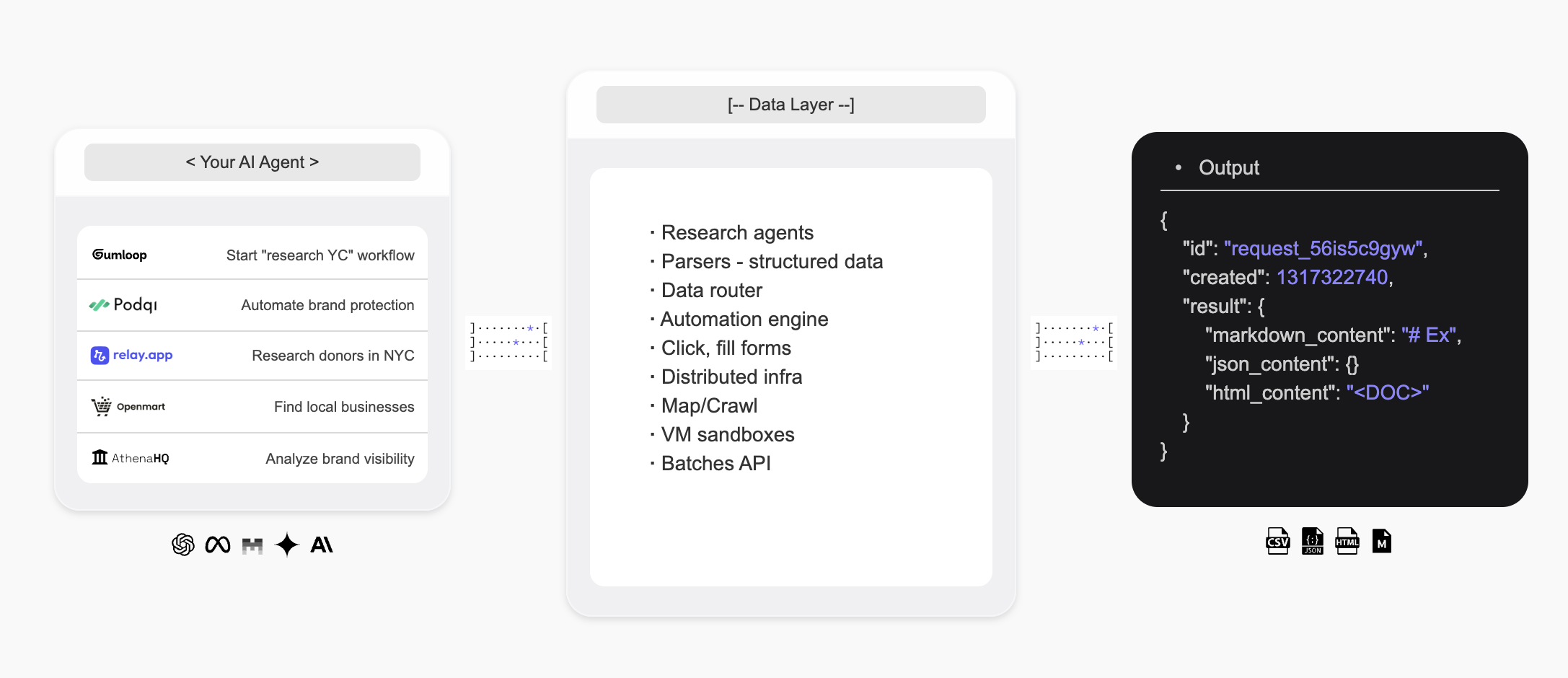
Olostep is infrastructure for the Web's second user — giving AI agents a way to search the web, extract structured data in real time, and build custom research agents.
 ## Introduction
* The **Olostep API** is the best **web search**, **scraping** and **crawling** API for AI used by some of the leading startups and scaleups in the world.
* The **Olostep Agent** allows to automate **research workflows** in a no code way with just a prompt in natural language.
**For AI agents:** fetch [docs.olostep.com/llms.txt](https://docs.olostep.com/llms.txt) for a complete index of this documentation before exploring further or [get started here](https://www.olostep.com/agent-onboarding/SKILL.md).
## Use Olostep from your terminal and AI agents
Beyond the API, Olostep ships a CLI, an MCP server, and drop-in skills so any tool — Claude Code, Cursor, Windsurf, and more — can use the web natively.
`npm i -g olostep-cli` — scrape, map, crawl, answer, and batch the web from your terminal. JSON output for scripts, CI, and agents.
Give any MCP client (Claude, Cursor, VS Code) live web tools. Hosted endpoint — no install.
Drop-in skills that teach AI coding agents how and when to use Olostep. Install with `olostep add skills`.
## What can Olostep do?
Pull any URL as clean Markdown, HTML, screenshots, or structured JSON.
Recursively gather every page on a site, with filters and search.
Get AI-synthesised answers from live web sources, with citations.
### Why Olostep?
* **Built for AI**: Clean Markdown, structured JSON, citations — output your agents and apps consume directly.
* **Reliable at scale**: Industry-leading success rate; handles JavaScript, anti-bot, and proxies under the hood.
* **Fast**: Sub-second single scrape; up to 10,000 URLs in a single batch in 5–7 minutes.
* **Cost-effective**: Significantly cheaper than alternatives at production scale.
* **CLI + MCP + Skills**: Use Olostep from your terminal, scripts, or any MCP-aware agent — agent skills included.
***
## Scrape
Pull any URL as clean Markdown. See the [Scrape feature docs](/features/scrapes) for all options.
```python Python theme={null}
from olostep import Olostep
client = Olostep(api_key="YOUR_REAL_KEY")
result = client.scrapes.create(
url_to_scrape="https://en.wikipedia.org/wiki/Alexander_the_Great",
formats=["markdown"],
)
print(result.markdown_content)
```
```js Node theme={null}
import Olostep from 'olostep'
const client = new Olostep({ apiKey: 'YOUR_REAL_KEY' })
const result = await client.scrapes.create({
url: 'https://en.wikipedia.org/wiki/Alexander_the_Great',
formats: ['markdown'],
})
console.log(result.markdown_content)
```
```bash cURL theme={null}
curl -s -X POST "https://api.olostep.com/v1/scrapes" \
-H "Authorization: Bearer $OLOSTEP_API_KEY" \
-H "Content-Type: application/json" \
-d '{
"url_to_scrape": "https://en.wikipedia.org/wiki/Alexander_the_Great",
"formats": ["markdown"]
}'
```
```bash CLI theme={null}
olostep scrape "https://en.wikipedia.org/wiki/Alexander_the_Great"
```
```json theme={null}
{
"id": "scrape_6h89o8u1kt",
"object": "scrape",
"result": {
"markdown_content": "## Alexander the Great...",
"markdown_hosted_url": "https://olostep-storage.s3.us-east-1.amazonaws.com/markDown_6h89o8u1kt.txt",
"page_metadata": { "status_code": 200, "title": "Alexander the Great - Wikipedia" }
}
}
```
## Crawl
Recursively gather every page on a site, with include/exclude filters and an optional `search_query` to focus the crawl. See [Crawl feature docs](/features/crawls).
```python Python theme={null}
from olostep import Olostep
client = Olostep(api_key="YOUR_REAL_KEY")
crawl = client.crawls.create(
start_url="https://docs.olostep.com",
max_pages=50,
)
for page in crawl.pages():
print(page.url)
```
```js Node theme={null}
import Olostep from 'olostep'
const client = new Olostep({ apiKey: 'YOUR_REAL_KEY' })
const crawl = await client.crawls.create({
url: 'https://docs.olostep.com',
maxPages: 50,
})
for await (const page of crawl.pages()) {
console.log(page.url)
}
```
```bash cURL theme={null}
curl -s -X POST "https://api.olostep.com/v1/crawls" \
-H "Authorization: Bearer $OLOSTEP_API_KEY" \
-H "Content-Type: application/json" \
-d '{
"start_url": "https://docs.olostep.com",
"max_pages": 50
}'
```
```bash CLI theme={null}
olostep crawl "https://docs.olostep.com" --max-pages 50
```
```json theme={null}
{
"id": "crawl_abc123",
"object": "crawl",
"status": "completed",
"pages_count": 47,
"pages": [
{ "url": "https://docs.olostep.com/get-started/welcome", "retrieve_id": "..." },
{ "url": "https://docs.olostep.com/features/scrapes", "retrieve_id": "..." }
]
}
```
## Answer
Ask a question and get an AI-synthesised answer from live web sources, with citations. Pass a JSON schema to shape the output. See [Answers docs](/features/answers).
```python Python theme={null}
from olostep import Olostep
client = Olostep(api_key="YOUR_REAL_KEY")
answer = client.answers.create(task="What does Olostep do?")
print(answer.result)
print(answer.sources)
```
```js Node theme={null}
import Olostep from 'olostep'
const client = new Olostep({ apiKey: 'YOUR_REAL_KEY' })
const answer = await client.answers.create({ task: 'What does Olostep do?' })
console.log(answer.result)
console.log(answer.sources)
```
```bash cURL theme={null}
curl -s -X POST "https://api.olostep.com/v1/answers" \
-H "Authorization: Bearer $OLOSTEP_API_KEY" \
-H "Content-Type: application/json" \
-d '{"task": "What does Olostep do?"}'
```
```bash CLI theme={null}
olostep answer "What does Olostep do?"
```
```json theme={null}
{
"id": "answer_abc123",
"object": "answer",
"task": "What does Olostep do?",
"result": {
"json_content": "{\"result\":\"Olostep is an API that lets AI agents search, scrape, and structure web data.\"}",
"sources": [
"https://docs.olostep.com/get-started/welcome",
"https://www.olostep.com/"
]
}
}
```
***
## More capabilities
Scrape up to 10,000 URLs in parallel; results back in 5–7 minutes.
Discover every URL on a site with include/exclude patterns.
Live web search with structured links and optional inline scraping.
Self-healing extractors that turn pages into typed JSON at scale.
Run scrapes, crawls, and answers on a recurring schedule.
Upload files for batches or to connect your knowledge base.
***
## Resources
Check out all supported features for your scraping and AI search needs.
Start using the API and test out the various params.
Use Olostep in n8n, make, relay, zapier, etc
Browse ready-to-use examples to get started quickly.
## Introduction
* The **Olostep API** is the best **web search**, **scraping** and **crawling** API for AI used by some of the leading startups and scaleups in the world.
* The **Olostep Agent** allows to automate **research workflows** in a no code way with just a prompt in natural language.
**For AI agents:** fetch [docs.olostep.com/llms.txt](https://docs.olostep.com/llms.txt) for a complete index of this documentation before exploring further or [get started here](https://www.olostep.com/agent-onboarding/SKILL.md).
## Use Olostep from your terminal and AI agents
Beyond the API, Olostep ships a CLI, an MCP server, and drop-in skills so any tool — Claude Code, Cursor, Windsurf, and more — can use the web natively.
`npm i -g olostep-cli` — scrape, map, crawl, answer, and batch the web from your terminal. JSON output for scripts, CI, and agents.
Give any MCP client (Claude, Cursor, VS Code) live web tools. Hosted endpoint — no install.
Drop-in skills that teach AI coding agents how and when to use Olostep. Install with `olostep add skills`.
## What can Olostep do?
Pull any URL as clean Markdown, HTML, screenshots, or structured JSON.
Recursively gather every page on a site, with filters and search.
Get AI-synthesised answers from live web sources, with citations.
### Why Olostep?
* **Built for AI**: Clean Markdown, structured JSON, citations — output your agents and apps consume directly.
* **Reliable at scale**: Industry-leading success rate; handles JavaScript, anti-bot, and proxies under the hood.
* **Fast**: Sub-second single scrape; up to 10,000 URLs in a single batch in 5–7 minutes.
* **Cost-effective**: Significantly cheaper than alternatives at production scale.
* **CLI + MCP + Skills**: Use Olostep from your terminal, scripts, or any MCP-aware agent — agent skills included.
***
## Scrape
Pull any URL as clean Markdown. See the [Scrape feature docs](/features/scrapes) for all options.
```python Python theme={null}
from olostep import Olostep
client = Olostep(api_key="YOUR_REAL_KEY")
result = client.scrapes.create(
url_to_scrape="https://en.wikipedia.org/wiki/Alexander_the_Great",
formats=["markdown"],
)
print(result.markdown_content)
```
```js Node theme={null}
import Olostep from 'olostep'
const client = new Olostep({ apiKey: 'YOUR_REAL_KEY' })
const result = await client.scrapes.create({
url: 'https://en.wikipedia.org/wiki/Alexander_the_Great',
formats: ['markdown'],
})
console.log(result.markdown_content)
```
```bash cURL theme={null}
curl -s -X POST "https://api.olostep.com/v1/scrapes" \
-H "Authorization: Bearer $OLOSTEP_API_KEY" \
-H "Content-Type: application/json" \
-d '{
"url_to_scrape": "https://en.wikipedia.org/wiki/Alexander_the_Great",
"formats": ["markdown"]
}'
```
```bash CLI theme={null}
olostep scrape "https://en.wikipedia.org/wiki/Alexander_the_Great"
```
```json theme={null}
{
"id": "scrape_6h89o8u1kt",
"object": "scrape",
"result": {
"markdown_content": "## Alexander the Great...",
"markdown_hosted_url": "https://olostep-storage.s3.us-east-1.amazonaws.com/markDown_6h89o8u1kt.txt",
"page_metadata": { "status_code": 200, "title": "Alexander the Great - Wikipedia" }
}
}
```
## Crawl
Recursively gather every page on a site, with include/exclude filters and an optional `search_query` to focus the crawl. See [Crawl feature docs](/features/crawls).
```python Python theme={null}
from olostep import Olostep
client = Olostep(api_key="YOUR_REAL_KEY")
crawl = client.crawls.create(
start_url="https://docs.olostep.com",
max_pages=50,
)
for page in crawl.pages():
print(page.url)
```
```js Node theme={null}
import Olostep from 'olostep'
const client = new Olostep({ apiKey: 'YOUR_REAL_KEY' })
const crawl = await client.crawls.create({
url: 'https://docs.olostep.com',
maxPages: 50,
})
for await (const page of crawl.pages()) {
console.log(page.url)
}
```
```bash cURL theme={null}
curl -s -X POST "https://api.olostep.com/v1/crawls" \
-H "Authorization: Bearer $OLOSTEP_API_KEY" \
-H "Content-Type: application/json" \
-d '{
"start_url": "https://docs.olostep.com",
"max_pages": 50
}'
```
```bash CLI theme={null}
olostep crawl "https://docs.olostep.com" --max-pages 50
```
```json theme={null}
{
"id": "crawl_abc123",
"object": "crawl",
"status": "completed",
"pages_count": 47,
"pages": [
{ "url": "https://docs.olostep.com/get-started/welcome", "retrieve_id": "..." },
{ "url": "https://docs.olostep.com/features/scrapes", "retrieve_id": "..." }
]
}
```
## Answer
Ask a question and get an AI-synthesised answer from live web sources, with citations. Pass a JSON schema to shape the output. See [Answers docs](/features/answers).
```python Python theme={null}
from olostep import Olostep
client = Olostep(api_key="YOUR_REAL_KEY")
answer = client.answers.create(task="What does Olostep do?")
print(answer.result)
print(answer.sources)
```
```js Node theme={null}
import Olostep from 'olostep'
const client = new Olostep({ apiKey: 'YOUR_REAL_KEY' })
const answer = await client.answers.create({ task: 'What does Olostep do?' })
console.log(answer.result)
console.log(answer.sources)
```
```bash cURL theme={null}
curl -s -X POST "https://api.olostep.com/v1/answers" \
-H "Authorization: Bearer $OLOSTEP_API_KEY" \
-H "Content-Type: application/json" \
-d '{"task": "What does Olostep do?"}'
```
```bash CLI theme={null}
olostep answer "What does Olostep do?"
```
```json theme={null}
{
"id": "answer_abc123",
"object": "answer",
"task": "What does Olostep do?",
"result": {
"json_content": "{\"result\":\"Olostep is an API that lets AI agents search, scrape, and structure web data.\"}",
"sources": [
"https://docs.olostep.com/get-started/welcome",
"https://www.olostep.com/"
]
}
}
```
***
## More capabilities
Scrape up to 10,000 URLs in parallel; results back in 5–7 minutes.
Discover every URL on a site with include/exclude patterns.
Live web search with structured links and optional inline scraping.
Self-healing extractors that turn pages into typed JSON at scale.
Run scrapes, crawls, and answers on a recurring schedule.
Upload files for batches or to connect your knowledge base.
***
## Resources
Check out all supported features for your scraping and AI search needs.
Start using the API and test out the various params.
Use Olostep in n8n, make, relay, zapier, etc
Browse ready-to-use examples to get started quickly.