> ## Documentation Index
> Fetch the complete documentation index at: https://docs.olostep.com/llms.txt
> Use this file to discover all available pages before exploring further.
# Benvenuto in Olostep
> Olostep: Infrastruttura per il secondo utente del Web. La migliore API di ricerca, scraping e crawling per l’AI.
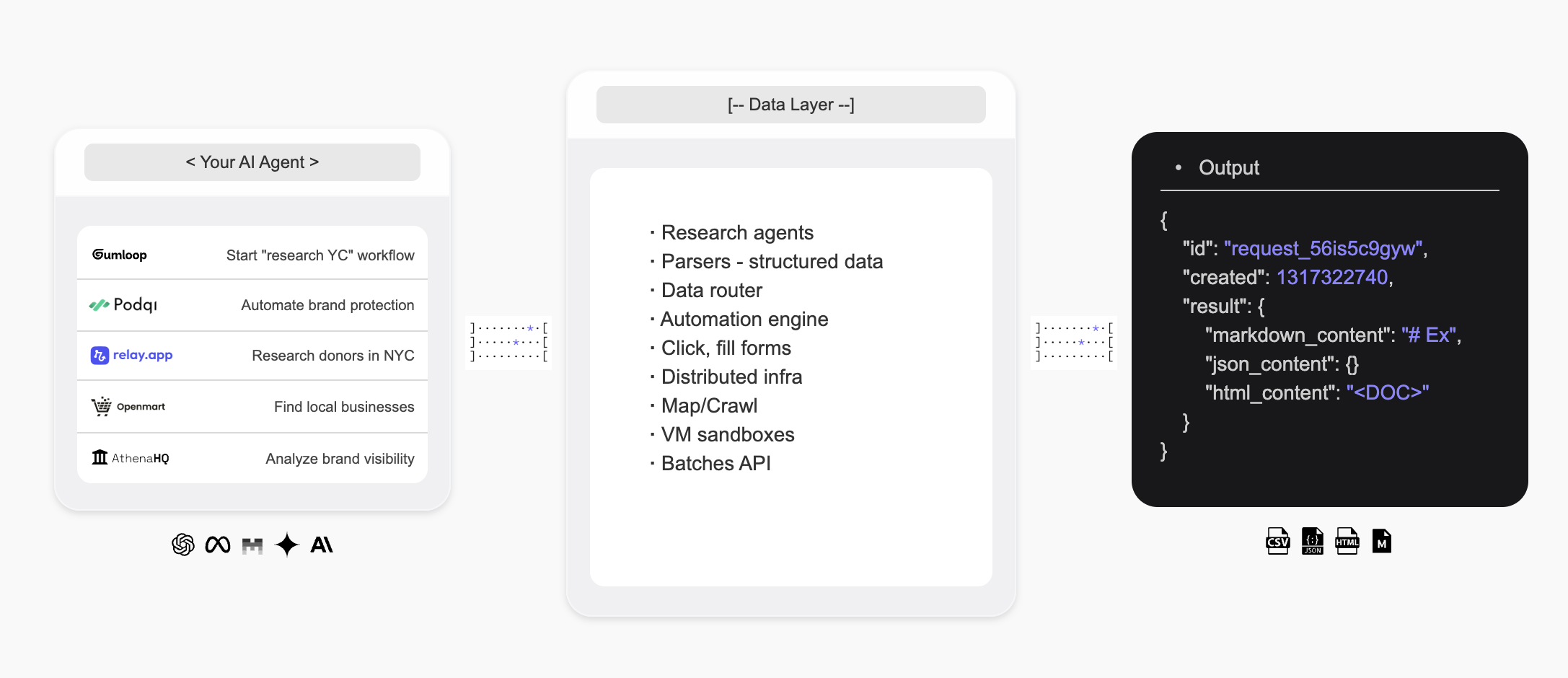
Olostep è l'infrastruttura per il secondo utente del Web — offre agli agenti AI un modo per cercare sul web, estrarre dati strutturati in tempo reale e costruire agenti di ricerca personalizzati.
 ## Introduzione
* L'**API di Olostep** è la migliore API di **ricerca web**, **scraping** e **crawling** per l'AI utilizzata da alcune delle principali startup e scaleup del mondo.
* L'**Agente Olostep** permette di automatizzare i **flussi di lavoro di ricerca** in modo no code con solo un prompt in linguaggio naturale.
**Per gli agenti AI:** scarica [docs.olostep.com/llms.txt](https://docs.olostep.com/llms.txt) per un indice completo di questa documentazione prima di esplorare ulteriormente o [inizia qui](https://www.olostep.com/agent-onboarding/SKILL.md).
## Usa Olostep dal tuo terminale e dagli agenti AI
Oltre all'API, Olostep offre un CLI, un server MCP e competenze pronte all'uso affinché qualsiasi strumento — Claude Code, Cursor, Windsurf e altri — possa utilizzare il web nativamente.
`npm i -g olostep-cli` — esegui scraping, mappa, esegui crawling, rispondi e gestisci il web in batch dal tuo terminale. Output JSON per script, CI e agenti.
Fornisci a qualsiasi client MCP (Claude, Cursor, VS Code) strumenti web live. Endpoint ospitato — nessuna installazione.
Competenze pronte all'uso che insegnano agli agenti di coding AI come e quando usare Olostep. Installa con `olostep add skills`.
## Cosa può fare Olostep?
Estrai qualsiasi URL come Markdown pulito, HTML, screenshot o JSON strutturato.
Raccogli ricorsivamente ogni pagina su un sito, con filtri e ricerca.
Ottieni risposte sintetizzate dall'AI da fonti web live, con citazioni.
### Perché Olostep?
* **Progettato per l'AI**: Markdown pulito, JSON strutturato, citazioni — output che i tuoi agenti e app consumano direttamente.
* **Affidabile su larga scala**: Tasso di successo leader nel settore; gestisce JavaScript, anti-bot e proxy in background.
* **Veloce**: Scraping singolo in meno di un secondo; fino a 10.000 URL in un singolo batch in 5–7 minuti.
* **Conveniente**: Significativamente più economico delle alternative su scala di produzione.
* **CLI + MCP + Competenze**: Usa Olostep dal tuo terminale, script o qualsiasi agente compatibile MCP — competenze degli agenti incluse.
***
## Scraping
Estrai qualsiasi URL come Markdown pulito. Consulta la [documentazione delle funzionalità di Scraping](/features/scrapes) per tutte le opzioni.
```python Python theme={null}
from olostep import Olostep
client = Olostep(api_key="YOUR_REAL_KEY")
result = client.scrapes.create(
url_to_scrape="https://en.wikipedia.org/wiki/Alexander_the_Great",
formats=["markdown"],
)
print(result.markdown_content)
```
```js Node theme={null}
import Olostep from 'olostep'
const client = new Olostep({ apiKey: 'YOUR_REAL_KEY' })
const result = await client.scrapes.create({
url: 'https://en.wikipedia.org/wiki/Alexander_the_Great',
formats: ['markdown'],
})
console.log(result.markdown_content)
```
```bash cURL theme={null}
curl -s -X POST "https://api.olostep.com/v1/scrapes" \
-H "Authorization: Bearer $OLOSTEP_API_KEY" \
-H "Content-Type: application/json" \
-d '{
"url_to_scrape": "https://en.wikipedia.org/wiki/Alexander_the_Great",
"formats": ["markdown"]
}'
```
```bash CLI theme={null}
olostep scrape "https://en.wikipedia.org/wiki/Alexander_the_Great"
```
```json theme={null}
{
"id": "scrape_6h89o8u1kt",
"object": "scrape",
"result": {
"markdown_content": "## Alexander the Great...",
"markdown_hosted_url": "https://olostep-storage.s3.us-east-1.amazonaws.com/markDown_6h89o8u1kt.txt",
"page_metadata": { "status_code": 200, "title": "Alexander the Great - Wikipedia" }
}
}
```
## Crawling
Raccogli ricorsivamente ogni pagina su un sito, con filtri di inclusione/esclusione e un eventuale `search_query` per focalizzare il crawling. Consulta la [documentazione delle funzionalità di Crawling](/features/crawls).
```python Python theme={null}
from olostep import Olostep
client = Olostep(api_key="YOUR_REAL_KEY")
crawl = client.crawls.create(
start_url="https://docs.olostep.com",
max_pages=50,
)
for page in crawl.pages():
print(page.url)
```
```js Node theme={null}
import Olostep from 'olostep'
const client = new Olostep({ apiKey: 'YOUR_REAL_KEY' })
const crawl = await client.crawls.create({
url: 'https://docs.olostep.com',
maxPages: 50,
})
for await (const page of crawl.pages()) {
console.log(page.url)
}
```
```bash cURL theme={null}
curl -s -X POST "https://api.olostep.com/v1/crawls" \
-H "Authorization: Bearer $OLOSTEP_API_KEY" \
-H "Content-Type: application/json" \
-d '{
"start_url": "https://docs.olostep.com",
"max_pages": 50
}'
```
```bash CLI theme={null}
olostep crawl "https://docs.olostep.com" --max-pages 50
```
```json theme={null}
{
"id": "crawl_abc123",
"object": "crawl",
"status": "completed",
"pages_count": 47,
"pages": [
{ "url": "https://docs.olostep.com/get-started/welcome", "retrieve_id": "..." },
{ "url": "https://docs.olostep.com/features/scrapes", "retrieve_id": "..." }
]
}
```
## Rispondi
Fai una domanda e ottieni una risposta sintetizzata dall'AI da fonti web live, con citazioni. Passa uno schema JSON per modellare l'output. Consulta la [documentazione delle Risposte](/features/answers).
```python Python theme={null}
from olostep import Olostep
client = Olostep(api_key="YOUR_REAL_KEY")
answer = client.answers.create(task="What does Olostep do?")
print(answer.result)
print(answer.sources)
```
```js Node theme={null}
import Olostep from 'olostep'
const client = new Olostep({ apiKey: 'YOUR_REAL_KEY' })
const answer = await client.answers.create({ task: 'What does Olostep do?' })
console.log(answer.result)
console.log(answer.sources)
```
```bash cURL theme={null}
curl -s -X POST "https://api.olostep.com/v1/answers" \
-H "Authorization: Bearer $OLOSTEP_API_KEY" \
-H "Content-Type: application/json" \
-d '{"task": "What does Olostep do?"}'
```
```bash CLI theme={null}
olostep answer "What does Olostep do?"
```
```json theme={null}
{
"id": "answer_abc123",
"object": "answer",
"task": "What does Olostep do?",
"result": {
"json_content": "{\"result\":\"Olostep is an API that lets AI agents search, scrape, and structure web data.\"}",
"sources": [
"https://docs.olostep.com/get-started/welcome",
"https://www.olostep.com/"
]
}
}
```
***
## Altre capacità
Esegui scraping fino a 10.000 URL in parallelo; risultati in 5–7 minuti.
Scopri ogni URL su un sito con pattern di inclusione/esclusione.
Ricerca web live con link strutturati e scraping inline opzionale.
Estrattori auto-riparanti che trasformano le pagine in JSON tipizzato su larga scala.
Esegui scraping, crawling e risposte su una programmazione ricorrente.
Carica file per batch o per connettere la tua base di conoscenza.
***
## Risorse
Scopri tutte le funzionalità supportate per le tue esigenze di scraping e ricerca AI.
Inizia a usare l'API e prova i vari parametri.
Usa Olostep in n8n, make, relay, zapier, ecc.
Sfoglia esempi pronti all'uso per iniziare rapidamente.
## Introduzione
* L'**API di Olostep** è la migliore API di **ricerca web**, **scraping** e **crawling** per l'AI utilizzata da alcune delle principali startup e scaleup del mondo.
* L'**Agente Olostep** permette di automatizzare i **flussi di lavoro di ricerca** in modo no code con solo un prompt in linguaggio naturale.
**Per gli agenti AI:** scarica [docs.olostep.com/llms.txt](https://docs.olostep.com/llms.txt) per un indice completo di questa documentazione prima di esplorare ulteriormente o [inizia qui](https://www.olostep.com/agent-onboarding/SKILL.md).
## Usa Olostep dal tuo terminale e dagli agenti AI
Oltre all'API, Olostep offre un CLI, un server MCP e competenze pronte all'uso affinché qualsiasi strumento — Claude Code, Cursor, Windsurf e altri — possa utilizzare il web nativamente.
`npm i -g olostep-cli` — esegui scraping, mappa, esegui crawling, rispondi e gestisci il web in batch dal tuo terminale. Output JSON per script, CI e agenti.
Fornisci a qualsiasi client MCP (Claude, Cursor, VS Code) strumenti web live. Endpoint ospitato — nessuna installazione.
Competenze pronte all'uso che insegnano agli agenti di coding AI come e quando usare Olostep. Installa con `olostep add skills`.
## Cosa può fare Olostep?
Estrai qualsiasi URL come Markdown pulito, HTML, screenshot o JSON strutturato.
Raccogli ricorsivamente ogni pagina su un sito, con filtri e ricerca.
Ottieni risposte sintetizzate dall'AI da fonti web live, con citazioni.
### Perché Olostep?
* **Progettato per l'AI**: Markdown pulito, JSON strutturato, citazioni — output che i tuoi agenti e app consumano direttamente.
* **Affidabile su larga scala**: Tasso di successo leader nel settore; gestisce JavaScript, anti-bot e proxy in background.
* **Veloce**: Scraping singolo in meno di un secondo; fino a 10.000 URL in un singolo batch in 5–7 minuti.
* **Conveniente**: Significativamente più economico delle alternative su scala di produzione.
* **CLI + MCP + Competenze**: Usa Olostep dal tuo terminale, script o qualsiasi agente compatibile MCP — competenze degli agenti incluse.
***
## Scraping
Estrai qualsiasi URL come Markdown pulito. Consulta la [documentazione delle funzionalità di Scraping](/features/scrapes) per tutte le opzioni.
```python Python theme={null}
from olostep import Olostep
client = Olostep(api_key="YOUR_REAL_KEY")
result = client.scrapes.create(
url_to_scrape="https://en.wikipedia.org/wiki/Alexander_the_Great",
formats=["markdown"],
)
print(result.markdown_content)
```
```js Node theme={null}
import Olostep from 'olostep'
const client = new Olostep({ apiKey: 'YOUR_REAL_KEY' })
const result = await client.scrapes.create({
url: 'https://en.wikipedia.org/wiki/Alexander_the_Great',
formats: ['markdown'],
})
console.log(result.markdown_content)
```
```bash cURL theme={null}
curl -s -X POST "https://api.olostep.com/v1/scrapes" \
-H "Authorization: Bearer $OLOSTEP_API_KEY" \
-H "Content-Type: application/json" \
-d '{
"url_to_scrape": "https://en.wikipedia.org/wiki/Alexander_the_Great",
"formats": ["markdown"]
}'
```
```bash CLI theme={null}
olostep scrape "https://en.wikipedia.org/wiki/Alexander_the_Great"
```
```json theme={null}
{
"id": "scrape_6h89o8u1kt",
"object": "scrape",
"result": {
"markdown_content": "## Alexander the Great...",
"markdown_hosted_url": "https://olostep-storage.s3.us-east-1.amazonaws.com/markDown_6h89o8u1kt.txt",
"page_metadata": { "status_code": 200, "title": "Alexander the Great - Wikipedia" }
}
}
```
## Crawling
Raccogli ricorsivamente ogni pagina su un sito, con filtri di inclusione/esclusione e un eventuale `search_query` per focalizzare il crawling. Consulta la [documentazione delle funzionalità di Crawling](/features/crawls).
```python Python theme={null}
from olostep import Olostep
client = Olostep(api_key="YOUR_REAL_KEY")
crawl = client.crawls.create(
start_url="https://docs.olostep.com",
max_pages=50,
)
for page in crawl.pages():
print(page.url)
```
```js Node theme={null}
import Olostep from 'olostep'
const client = new Olostep({ apiKey: 'YOUR_REAL_KEY' })
const crawl = await client.crawls.create({
url: 'https://docs.olostep.com',
maxPages: 50,
})
for await (const page of crawl.pages()) {
console.log(page.url)
}
```
```bash cURL theme={null}
curl -s -X POST "https://api.olostep.com/v1/crawls" \
-H "Authorization: Bearer $OLOSTEP_API_KEY" \
-H "Content-Type: application/json" \
-d '{
"start_url": "https://docs.olostep.com",
"max_pages": 50
}'
```
```bash CLI theme={null}
olostep crawl "https://docs.olostep.com" --max-pages 50
```
```json theme={null}
{
"id": "crawl_abc123",
"object": "crawl",
"status": "completed",
"pages_count": 47,
"pages": [
{ "url": "https://docs.olostep.com/get-started/welcome", "retrieve_id": "..." },
{ "url": "https://docs.olostep.com/features/scrapes", "retrieve_id": "..." }
]
}
```
## Rispondi
Fai una domanda e ottieni una risposta sintetizzata dall'AI da fonti web live, con citazioni. Passa uno schema JSON per modellare l'output. Consulta la [documentazione delle Risposte](/features/answers).
```python Python theme={null}
from olostep import Olostep
client = Olostep(api_key="YOUR_REAL_KEY")
answer = client.answers.create(task="What does Olostep do?")
print(answer.result)
print(answer.sources)
```
```js Node theme={null}
import Olostep from 'olostep'
const client = new Olostep({ apiKey: 'YOUR_REAL_KEY' })
const answer = await client.answers.create({ task: 'What does Olostep do?' })
console.log(answer.result)
console.log(answer.sources)
```
```bash cURL theme={null}
curl -s -X POST "https://api.olostep.com/v1/answers" \
-H "Authorization: Bearer $OLOSTEP_API_KEY" \
-H "Content-Type: application/json" \
-d '{"task": "What does Olostep do?"}'
```
```bash CLI theme={null}
olostep answer "What does Olostep do?"
```
```json theme={null}
{
"id": "answer_abc123",
"object": "answer",
"task": "What does Olostep do?",
"result": {
"json_content": "{\"result\":\"Olostep is an API that lets AI agents search, scrape, and structure web data.\"}",
"sources": [
"https://docs.olostep.com/get-started/welcome",
"https://www.olostep.com/"
]
}
}
```
***
## Altre capacità
Esegui scraping fino a 10.000 URL in parallelo; risultati in 5–7 minuti.
Scopri ogni URL su un sito con pattern di inclusione/esclusione.
Ricerca web live con link strutturati e scraping inline opzionale.
Estrattori auto-riparanti che trasformano le pagine in JSON tipizzato su larga scala.
Esegui scraping, crawling e risposte su una programmazione ricorrente.
Carica file per batch o per connettere la tua base di conoscenza.
***
## Risorse
Scopri tutte le funzionalità supportate per le tue esigenze di scraping e ricerca AI.
Inizia a usare l'API e prova i vari parametri.
Usa Olostep in n8n, make, relay, zapier, ecc.
Sfoglia esempi pronti all'uso per iniziare rapidamente.