> ## Documentation Index
> Fetch the complete documentation index at: https://docs.olostep.com/llms.txt
> Use this file to discover all available pages before exploring further.
# Olostepへようこそ
> Olostep: Webの第二のユーザーのためのインフラストラクチャ。AIのための最高の検索、スクレイピング、クローリングAPI。
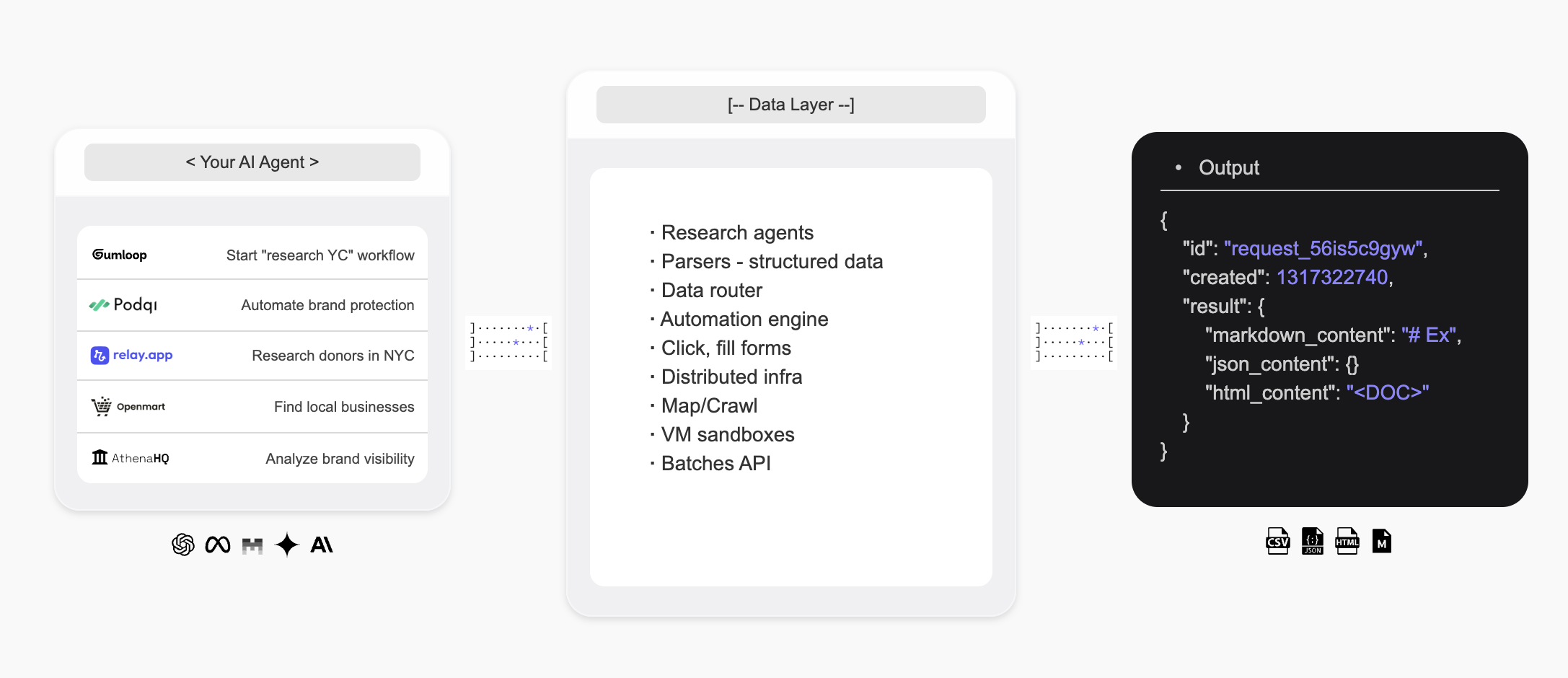
OlostepはWebの第二のユーザーのためのインフラストラクチャであり、AIエージェントにウェブを検索し、リアルタイムで構造化データを抽出し、カスタムリサーチエージェントを構築する方法を提供します。
 ## はじめに
* **Olostep API**は、世界の主要なスタートアップやスケールアップ企業が使用する、AIのための最高の**ウェブ検索**、**スクレイピング**、**クローリング**APIです。
* **Olostep Agent**は、自然言語でのプロンプトだけで**リサーチワークフロー**をノーコードで自動化することができます。
**AIエージェント向け:** このドキュメントの完全なインデックスを取得するには、[docs.olostep.com/llms.txt](https://docs.olostep.com/llms.txt)をフェッチしてからさらに探索するか、[こちらから始めてください](https://www.olostep.com/agent-onboarding/SKILL.md)。
## ターミナルとAIエージェントからOlostepを使用する
APIに加えて、OlostepはCLI、MCPサーバー、およびドロップインスキルを提供しており、Claude Code、Cursor、Windsurfなどのツールがネイティブにウェブを利用できるようにします。
`npm i -g olostep-cli` — ターミナルからウェブをスクレイプ、マップ、クローリング、回答、バッチ処理。スクリプト、CI、エージェント向けのJSON出力。
任意のMCPクライアント(Claude、Cursor、VS Code)にライブウェブツールを提供。ホストされたエンドポイント — インストール不要。
AIコーディングエージェントにOlostepの使用方法を教えるドロップインスキル。`olostep add skills`でインストール。
## Olostepでできること
任意のURLをクリーンなMarkdown、HTML、スクリーンショット、または構造化JSONとして取得。
サイト上のすべてのページを再帰的に収集し、フィルターと検索を使用。
ライブウェブソースからAI合成された回答を取得し、引用を付ける。
### なぜOlostepなのか?
* **AI向けに構築**: クリーンなMarkdown、構造化JSON、引用 — エージェントとアプリが直接消費する出力。
* **スケールでの信頼性**: 業界をリードする成功率; JavaScript、アンチボット、プロキシを内部で処理。
* **高速**: 単一スクレイプはサブセカンド; 5〜7分で最大10,000のURLを一括処理。
* **コスト効率**: 生産スケールでの代替案よりも大幅に安価。
* **CLI + MCP + スキル**: ターミナル、スクリプト、または任意のMCP対応エージェントからOlostepを使用 — エージェントスキルが含まれています。
***
## スクレイプ
任意のURLをクリーンなMarkdownとして取得します。すべてのオプションについては[スクレイプ機能ドキュメント](/features/scrapes)を参照してください。
```python Python theme={null}
from olostep import Olostep
client = Olostep(api_key="YOUR_REAL_KEY")
result = client.scrapes.create(
url_to_scrape="https://en.wikipedia.org/wiki/Alexander_the_Great",
formats=["markdown"],
)
print(result.markdown_content)
```
```js Node theme={null}
import Olostep from 'olostep'
const client = new Olostep({ apiKey: 'YOUR_REAL_KEY' })
const result = await client.scrapes.create({
url: 'https://en.wikipedia.org/wiki/Alexander_the_Great',
formats: ['markdown'],
})
console.log(result.markdown_content)
```
```bash cURL theme={null}
curl -s -X POST "https://api.olostep.com/v1/scrapes" \
-H "Authorization: Bearer $OLOSTEP_API_KEY" \
-H "Content-Type: application/json" \
-d '{
"url_to_scrape": "https://en.wikipedia.org/wiki/Alexander_the_Great",
"formats": ["markdown"]
}'
```
```bash CLI theme={null}
olostep scrape "https://en.wikipedia.org/wiki/Alexander_the_Great"
```
```json theme={null}
{
"id": "scrape_6h89o8u1kt",
"object": "scrape",
"result": {
"markdown_content": "## Alexander the Great...",
"markdown_hosted_url": "https://olostep-storage.s3.us-east-1.amazonaws.com/markDown_6h89o8u1kt.txt",
"page_metadata": { "status_code": 200, "title": "Alexander the Great - Wikipedia" }
}
}
```
## クローリング
サイト上のすべてのページを再帰的に収集し、include/excludeフィルターとオプションの`search_query`を使用してクローリングを集中させます。[クローリング機能ドキュメント](/features/crawls)を参照してください。
```python Python theme={null}
from olostep import Olostep
client = Olostep(api_key="YOUR_REAL_KEY")
crawl = client.crawls.create(
start_url="https://docs.olostep.com",
max_pages=50,
)
for page in crawl.pages():
print(page.url)
```
```js Node theme={null}
import Olostep from 'olostep'
const client = new Olostep({ apiKey: 'YOUR_REAL_KEY' })
const crawl = await client.crawls.create({
url: 'https://docs.olostep.com',
maxPages: 50,
})
for await (const page of crawl.pages()) {
console.log(page.url)
}
```
```bash cURL theme={null}
curl -s -X POST "https://api.olostep.com/v1/crawls" \
-H "Authorization: Bearer $OLOSTEP_API_KEY" \
-H "Content-Type: application/json" \
-d '{
"start_url": "https://docs.olostep.com",
"max_pages": 50
}'
```
```bash CLI theme={null}
olostep crawl "https://docs.olostep.com" --max-pages 50
```
```json theme={null}
{
"id": "crawl_abc123",
"object": "crawl",
"status": "completed",
"pages_count": 47,
"pages": [
{ "url": "https://docs.olostep.com/get-started/welcome", "retrieve_id": "..." },
{ "url": "https://docs.olostep.com/features/scrapes", "retrieve_id": "..." }
]
}
```
## 回答
質問をして、ライブウェブソースからAI合成された回答を取得し、引用を付けます。出力を形作るためにJSONスキーマを渡します。[回答ドキュメント](/features/answers)を参照してください。
```python Python theme={null}
from olostep import Olostep
client = Olostep(api_key="YOUR_REAL_KEY")
answer = client.answers.create(task="What does Olostep do?")
print(answer.result)
print(answer.sources)
```
```js Node theme={null}
import Olostep from 'olostep'
const client = new Olostep({ apiKey: 'YOUR_REAL_KEY' })
const answer = await client.answers.create({ task: 'What does Olostep do?' })
console.log(answer.result)
console.log(answer.sources)
```
```bash cURL theme={null}
curl -s -X POST "https://api.olostep.com/v1/answers" \
-H "Authorization: Bearer $OLOSTEP_API_KEY" \
-H "Content-Type: application/json" \
-d '{"task": "What does Olostep do?"}'
```
```bash CLI theme={null}
olostep answer "What does Olostep do?"
```
```json theme={null}
{
"id": "answer_abc123",
"object": "answer",
"task": "What does Olostep do?",
"result": {
"json_content": "{\"result\":\"Olostep is an API that lets AI agents search, scrape, and structure web data.\"}",
"sources": [
"https://docs.olostep.com/get-started/welcome",
"https://www.olostep.com/"
]
}
}
```
***
## その他の機能
最大10,000のURLを並行してスクレイプし、5〜7分で結果を返します。
include/excludeパターンを使用してサイト上のすべてのURLを発見します。
構造化リンクとオプションのインラインスクレイピングを使用したライブウェブ検索。
ページをスケールで型付きJSONに変換する自己修復エクストラクター。
定期的なスケジュールでスクレイプ、クローリング、回答を実行します。
バッチ用にファイルをアップロードしたり、ナレッジベースに接続します。
***
## リソース
スクレイピングとAI検索のニーズに対応するすべてのサポート機能をチェックしてください。
APIを使用し始め、さまざまなパラメータをテストしてください。
Olostepをn8n、make、relay、zapierなどで使用します。
すぐに始められる準備済みの例を閲覧してください。
## はじめに
* **Olostep API**は、世界の主要なスタートアップやスケールアップ企業が使用する、AIのための最高の**ウェブ検索**、**スクレイピング**、**クローリング**APIです。
* **Olostep Agent**は、自然言語でのプロンプトだけで**リサーチワークフロー**をノーコードで自動化することができます。
**AIエージェント向け:** このドキュメントの完全なインデックスを取得するには、[docs.olostep.com/llms.txt](https://docs.olostep.com/llms.txt)をフェッチしてからさらに探索するか、[こちらから始めてください](https://www.olostep.com/agent-onboarding/SKILL.md)。
## ターミナルとAIエージェントからOlostepを使用する
APIに加えて、OlostepはCLI、MCPサーバー、およびドロップインスキルを提供しており、Claude Code、Cursor、Windsurfなどのツールがネイティブにウェブを利用できるようにします。
`npm i -g olostep-cli` — ターミナルからウェブをスクレイプ、マップ、クローリング、回答、バッチ処理。スクリプト、CI、エージェント向けのJSON出力。
任意のMCPクライアント(Claude、Cursor、VS Code)にライブウェブツールを提供。ホストされたエンドポイント — インストール不要。
AIコーディングエージェントにOlostepの使用方法を教えるドロップインスキル。`olostep add skills`でインストール。
## Olostepでできること
任意のURLをクリーンなMarkdown、HTML、スクリーンショット、または構造化JSONとして取得。
サイト上のすべてのページを再帰的に収集し、フィルターと検索を使用。
ライブウェブソースからAI合成された回答を取得し、引用を付ける。
### なぜOlostepなのか?
* **AI向けに構築**: クリーンなMarkdown、構造化JSON、引用 — エージェントとアプリが直接消費する出力。
* **スケールでの信頼性**: 業界をリードする成功率; JavaScript、アンチボット、プロキシを内部で処理。
* **高速**: 単一スクレイプはサブセカンド; 5〜7分で最大10,000のURLを一括処理。
* **コスト効率**: 生産スケールでの代替案よりも大幅に安価。
* **CLI + MCP + スキル**: ターミナル、スクリプト、または任意のMCP対応エージェントからOlostepを使用 — エージェントスキルが含まれています。
***
## スクレイプ
任意のURLをクリーンなMarkdownとして取得します。すべてのオプションについては[スクレイプ機能ドキュメント](/features/scrapes)を参照してください。
```python Python theme={null}
from olostep import Olostep
client = Olostep(api_key="YOUR_REAL_KEY")
result = client.scrapes.create(
url_to_scrape="https://en.wikipedia.org/wiki/Alexander_the_Great",
formats=["markdown"],
)
print(result.markdown_content)
```
```js Node theme={null}
import Olostep from 'olostep'
const client = new Olostep({ apiKey: 'YOUR_REAL_KEY' })
const result = await client.scrapes.create({
url: 'https://en.wikipedia.org/wiki/Alexander_the_Great',
formats: ['markdown'],
})
console.log(result.markdown_content)
```
```bash cURL theme={null}
curl -s -X POST "https://api.olostep.com/v1/scrapes" \
-H "Authorization: Bearer $OLOSTEP_API_KEY" \
-H "Content-Type: application/json" \
-d '{
"url_to_scrape": "https://en.wikipedia.org/wiki/Alexander_the_Great",
"formats": ["markdown"]
}'
```
```bash CLI theme={null}
olostep scrape "https://en.wikipedia.org/wiki/Alexander_the_Great"
```
```json theme={null}
{
"id": "scrape_6h89o8u1kt",
"object": "scrape",
"result": {
"markdown_content": "## Alexander the Great...",
"markdown_hosted_url": "https://olostep-storage.s3.us-east-1.amazonaws.com/markDown_6h89o8u1kt.txt",
"page_metadata": { "status_code": 200, "title": "Alexander the Great - Wikipedia" }
}
}
```
## クローリング
サイト上のすべてのページを再帰的に収集し、include/excludeフィルターとオプションの`search_query`を使用してクローリングを集中させます。[クローリング機能ドキュメント](/features/crawls)を参照してください。
```python Python theme={null}
from olostep import Olostep
client = Olostep(api_key="YOUR_REAL_KEY")
crawl = client.crawls.create(
start_url="https://docs.olostep.com",
max_pages=50,
)
for page in crawl.pages():
print(page.url)
```
```js Node theme={null}
import Olostep from 'olostep'
const client = new Olostep({ apiKey: 'YOUR_REAL_KEY' })
const crawl = await client.crawls.create({
url: 'https://docs.olostep.com',
maxPages: 50,
})
for await (const page of crawl.pages()) {
console.log(page.url)
}
```
```bash cURL theme={null}
curl -s -X POST "https://api.olostep.com/v1/crawls" \
-H "Authorization: Bearer $OLOSTEP_API_KEY" \
-H "Content-Type: application/json" \
-d '{
"start_url": "https://docs.olostep.com",
"max_pages": 50
}'
```
```bash CLI theme={null}
olostep crawl "https://docs.olostep.com" --max-pages 50
```
```json theme={null}
{
"id": "crawl_abc123",
"object": "crawl",
"status": "completed",
"pages_count": 47,
"pages": [
{ "url": "https://docs.olostep.com/get-started/welcome", "retrieve_id": "..." },
{ "url": "https://docs.olostep.com/features/scrapes", "retrieve_id": "..." }
]
}
```
## 回答
質問をして、ライブウェブソースからAI合成された回答を取得し、引用を付けます。出力を形作るためにJSONスキーマを渡します。[回答ドキュメント](/features/answers)を参照してください。
```python Python theme={null}
from olostep import Olostep
client = Olostep(api_key="YOUR_REAL_KEY")
answer = client.answers.create(task="What does Olostep do?")
print(answer.result)
print(answer.sources)
```
```js Node theme={null}
import Olostep from 'olostep'
const client = new Olostep({ apiKey: 'YOUR_REAL_KEY' })
const answer = await client.answers.create({ task: 'What does Olostep do?' })
console.log(answer.result)
console.log(answer.sources)
```
```bash cURL theme={null}
curl -s -X POST "https://api.olostep.com/v1/answers" \
-H "Authorization: Bearer $OLOSTEP_API_KEY" \
-H "Content-Type: application/json" \
-d '{"task": "What does Olostep do?"}'
```
```bash CLI theme={null}
olostep answer "What does Olostep do?"
```
```json theme={null}
{
"id": "answer_abc123",
"object": "answer",
"task": "What does Olostep do?",
"result": {
"json_content": "{\"result\":\"Olostep is an API that lets AI agents search, scrape, and structure web data.\"}",
"sources": [
"https://docs.olostep.com/get-started/welcome",
"https://www.olostep.com/"
]
}
}
```
***
## その他の機能
最大10,000のURLを並行してスクレイプし、5〜7分で結果を返します。
include/excludeパターンを使用してサイト上のすべてのURLを発見します。
構造化リンクとオプションのインラインスクレイピングを使用したライブウェブ検索。
ページをスケールで型付きJSONに変換する自己修復エクストラクター。
定期的なスケジュールでスクレイプ、クローリング、回答を実行します。
バッチ用にファイルをアップロードしたり、ナレッジベースに接続します。
***
## リソース
スクレイピングとAI検索のニーズに対応するすべてのサポート機能をチェックしてください。
APIを使用し始め、さまざまなパラメータをテストしてください。
Olostepをn8n、make、relay、zapierなどで使用します。
すぐに始められる準備済みの例を閲覧してください。