> ## Documentation Index
> Fetch the complete documentation index at: https://docs.olostep.com/llms.txt
> Use this file to discover all available pages before exploring further.
# Welkom bij Olostep
> Olostep: Infrastructuur voor de tweede gebruiker van het web. De beste zoek-, scraping- en crawling-API voor AI.
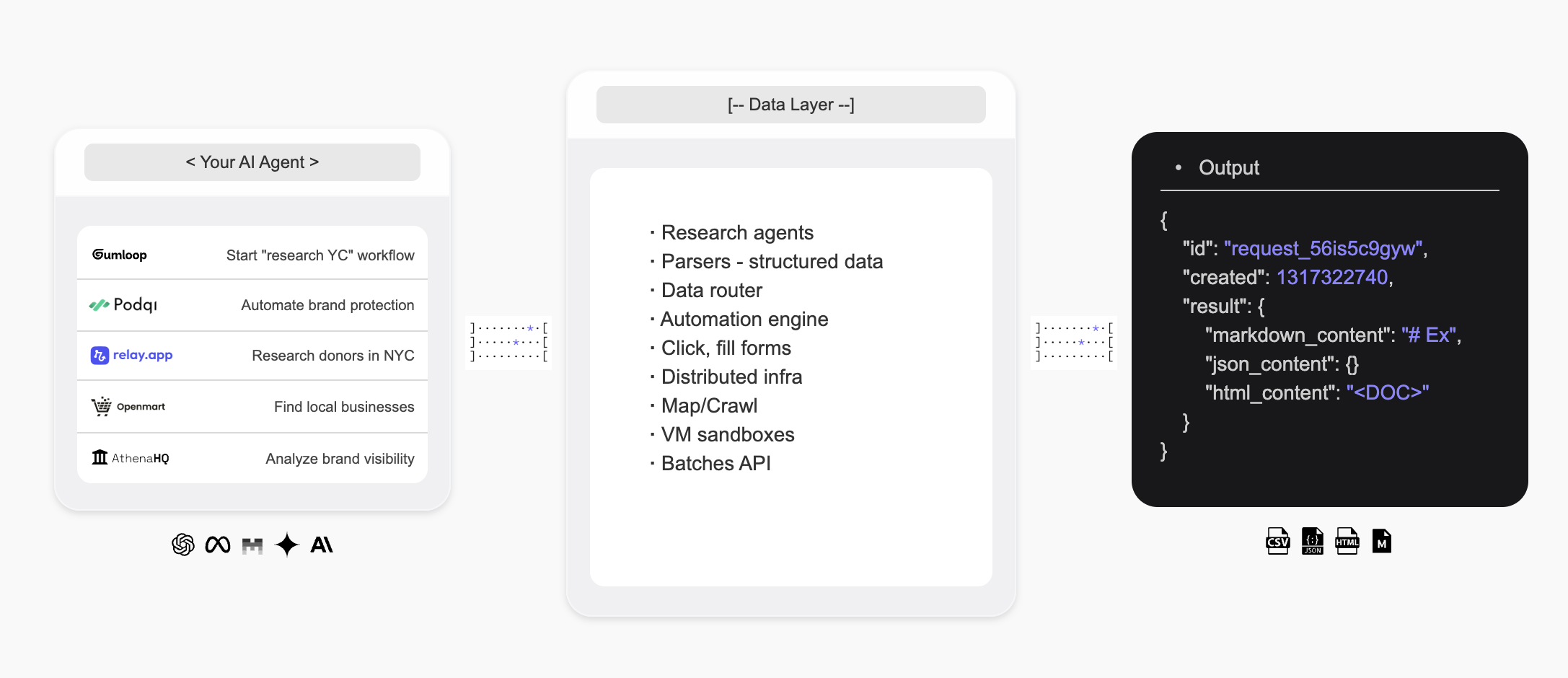
Olostep is infrastructuur voor de tweede gebruiker van het web — het biedt AI-agenten een manier om het web te doorzoeken, gestructureerde data in real-time te extraheren en aangepaste onderzoeksagenten te bouwen.
 ## Introductie
* De **Olostep API** is de beste **webzoek**, **scraping** en **crawling** API voor AI, gebruikt door enkele van de toonaangevende startups en scale-ups ter wereld.
* De **Olostep Agent** maakt het mogelijk om **onderzoeksworkflows** te automatiseren op een no-code manier met slechts een prompt in natuurlijke taal.
**Voor AI-agenten:** haal [docs.olostep.com/llms.txt](https://docs.olostep.com/llms.txt) op voor een volledige index van deze documentatie voordat je verder verkent of [begin hier](https://www.olostep.com/agent-onboarding/SKILL.md).
## Gebruik Olostep vanaf je terminal en AI-agenten
Naast de API levert Olostep een CLI, een MCP-server en drop-in skills zodat elke tool — Claude Code, Cursor, Windsurf en meer — het web native kan gebruiken.
`npm i -g olostep-cli` — scrape, map, crawl, antwoord en batch het web vanaf je terminal. JSON-uitvoer voor scripts, CI en agenten.
Geef elke MCP-client (Claude, Cursor, VS Code) live webtools. Gehoste endpoint — geen installatie.
Drop-in skills die AI-coderingsagenten leren hoe en wanneer Olostep te gebruiken. Installeer met `olostep add skills`.
## Wat kan Olostep doen?
Haal elke URL op als schone Markdown, HTML, screenshots of gestructureerde JSON.
Verzamel elke pagina op een site recursief, met filters en zoekopties.
Krijg AI-gesynthetiseerde antwoorden van live webbronnen, met citaties.
### Waarom Olostep?
* **Gebouwd voor AI**: Schone Markdown, gestructureerde JSON, citaties — uitvoer die je agenten en apps direct consumeren.
* **Betrouwbaar op schaal**: Toonaangevende succesratio; verwerkt JavaScript, anti-bot en proxies onder de motorkap.
* **Snel**: Sub-seconde enkele scrape; tot 10.000 URLs in een enkele batch in 5–7 minuten.
* **Kosteneffectief**: Aanzienlijk goedkoper dan alternatieven op productieschaal.
* **CLI + MCP + Skills**: Gebruik Olostep vanaf je terminal, scripts of elke MCP-bewuste agent — agent skills inbegrepen.
***
## Scrape
Haal elke URL op als schone Markdown. Zie de [Scrape feature docs](/features/scrapes) voor alle opties.
```python Python theme={null}
from olostep import Olostep
client = Olostep(api_key="YOUR_REAL_KEY")
result = client.scrapes.create(
url_to_scrape="https://en.wikipedia.org/wiki/Alexander_the_Great",
formats=["markdown"],
)
print(result.markdown_content)
```
```js Node theme={null}
import Olostep from 'olostep'
const client = new Olostep({ apiKey: 'YOUR_REAL_KEY' })
const result = await client.scrapes.create({
url: 'https://en.wikipedia.org/wiki/Alexander_the_Great',
formats: ['markdown'],
})
console.log(result.markdown_content)
```
```bash cURL theme={null}
curl -s -X POST "https://api.olostep.com/v1/scrapes" \
-H "Authorization: Bearer $OLOSTEP_API_KEY" \
-H "Content-Type: application/json" \
-d '{
"url_to_scrape": "https://en.wikipedia.org/wiki/Alexander_the_Great",
"formats": ["markdown"]
}'
```
```bash CLI theme={null}
olostep scrape "https://en.wikipedia.org/wiki/Alexander_the_Great"
```
```json theme={null}
{
"id": "scrape_6h89o8u1kt",
"object": "scrape",
"result": {
"markdown_content": "## Alexander de Grote...",
"markdown_hosted_url": "https://olostep-storage.s3.us-east-1.amazonaws.com/markDown_6h89o8u1kt.txt",
"page_metadata": { "status_code": 200, "title": "Alexander de Grote - Wikipedia" }
}
}
```
## Crawl
Verzamel elke pagina op een site recursief, met include/exclude filters en een optionele `search_query` om de crawl te richten. Zie [Crawl feature docs](/features/crawls).
```python Python theme={null}
from olostep import Olostep
client = Olostep(api_key="YOUR_REAL_KEY")
crawl = client.crawls.create(
start_url="https://docs.olostep.com",
max_pages=50,
)
for page in crawl.pages():
print(page.url)
```
```js Node theme={null}
import Olostep from 'olostep'
const client = new Olostep({ apiKey: 'YOUR_REAL_KEY' })
const crawl = await client.crawls.create({
url: 'https://docs.olostep.com',
maxPages: 50,
})
for await (const page of crawl.pages()) {
console.log(page.url)
}
```
```bash cURL theme={null}
curl -s -X POST "https://api.olostep.com/v1/crawls" \
-H "Authorization: Bearer $OLOSTEP_API_KEY" \
-H "Content-Type: application/json" \
-d '{
"start_url": "https://docs.olostep.com",
"max_pages": 50
}'
```
```bash CLI theme={null}
olostep crawl "https://docs.olostep.com" --max-pages 50
```
```json theme={null}
{
"id": "crawl_abc123",
"object": "crawl",
"status": "completed",
"pages_count": 47,
"pages": [
{ "url": "https://docs.olostep.com/get-started/welcome", "retrieve_id": "..." },
{ "url": "https://docs.olostep.com/features/scrapes", "retrieve_id": "..." }
]
}
```
## Antwoord
Stel een vraag en krijg een AI-gesynthetiseerd antwoord van live webbronnen, met citaties. Geef een JSON-schema door om de output te vormen. Zie [Antwoorden docs](/features/answers).
```python Python theme={null}
from olostep import Olostep
client = Olostep(api_key="YOUR_REAL_KEY")
answer = client.answers.create(task="What does Olostep do?")
print(answer.result)
print(answer.sources)
```
```js Node theme={null}
import Olostep from 'olostep'
const client = new Olostep({ apiKey: 'YOUR_REAL_KEY' })
const answer = await client.answers.create({ task: 'What does Olostep do?' })
console.log(answer.result)
console.log(answer.sources)
```
```bash cURL theme={null}
curl -s -X POST "https://api.olostep.com/v1/answers" \
-H "Authorization: Bearer $OLOSTEP_API_KEY" \
-H "Content-Type: application/json" \
-d '{"task": "What does Olostep do?"}'
```
```bash CLI theme={null}
olostep answer "What does Olostep do?"
```
```json theme={null}
{
"id": "answer_abc123",
"object": "answer",
"task": "What does Olostep do?",
"result": {
"json_content": "{\"result\":\"Olostep is an API that lets AI agents search, scrape, and structure web data.\"}",
"sources": [
"https://docs.olostep.com/get-started/welcome",
"https://www.olostep.com/"
]
}
}
```
***
## Meer mogelijkheden
Scrape tot 10.000 URLs parallel; resultaten binnen 5–7 minuten terug.
Ontdek elke URL op een site met include/exclude patronen.
Live webzoek met gestructureerde links en optionele inline scraping.
Zelfherstellende extractors die pagina's omzetten in getypte JSON op schaal.
Voer scrapes, crawls en antwoorden uit op een terugkerend schema.
Upload bestanden voor batches of om je kennisbank te verbinden.
***
## Bronnen
Bekijk alle ondersteunde functies voor je scraping- en AI-zoekbehoeften.
Begin met het gebruiken van de API en test de verschillende parameters.
Gebruik Olostep in n8n, make, relay, zapier, etc.
Blader door kant-en-klare voorbeelden om snel aan de slag te gaan.
## Introductie
* De **Olostep API** is de beste **webzoek**, **scraping** en **crawling** API voor AI, gebruikt door enkele van de toonaangevende startups en scale-ups ter wereld.
* De **Olostep Agent** maakt het mogelijk om **onderzoeksworkflows** te automatiseren op een no-code manier met slechts een prompt in natuurlijke taal.
**Voor AI-agenten:** haal [docs.olostep.com/llms.txt](https://docs.olostep.com/llms.txt) op voor een volledige index van deze documentatie voordat je verder verkent of [begin hier](https://www.olostep.com/agent-onboarding/SKILL.md).
## Gebruik Olostep vanaf je terminal en AI-agenten
Naast de API levert Olostep een CLI, een MCP-server en drop-in skills zodat elke tool — Claude Code, Cursor, Windsurf en meer — het web native kan gebruiken.
`npm i -g olostep-cli` — scrape, map, crawl, antwoord en batch het web vanaf je terminal. JSON-uitvoer voor scripts, CI en agenten.
Geef elke MCP-client (Claude, Cursor, VS Code) live webtools. Gehoste endpoint — geen installatie.
Drop-in skills die AI-coderingsagenten leren hoe en wanneer Olostep te gebruiken. Installeer met `olostep add skills`.
## Wat kan Olostep doen?
Haal elke URL op als schone Markdown, HTML, screenshots of gestructureerde JSON.
Verzamel elke pagina op een site recursief, met filters en zoekopties.
Krijg AI-gesynthetiseerde antwoorden van live webbronnen, met citaties.
### Waarom Olostep?
* **Gebouwd voor AI**: Schone Markdown, gestructureerde JSON, citaties — uitvoer die je agenten en apps direct consumeren.
* **Betrouwbaar op schaal**: Toonaangevende succesratio; verwerkt JavaScript, anti-bot en proxies onder de motorkap.
* **Snel**: Sub-seconde enkele scrape; tot 10.000 URLs in een enkele batch in 5–7 minuten.
* **Kosteneffectief**: Aanzienlijk goedkoper dan alternatieven op productieschaal.
* **CLI + MCP + Skills**: Gebruik Olostep vanaf je terminal, scripts of elke MCP-bewuste agent — agent skills inbegrepen.
***
## Scrape
Haal elke URL op als schone Markdown. Zie de [Scrape feature docs](/features/scrapes) voor alle opties.
```python Python theme={null}
from olostep import Olostep
client = Olostep(api_key="YOUR_REAL_KEY")
result = client.scrapes.create(
url_to_scrape="https://en.wikipedia.org/wiki/Alexander_the_Great",
formats=["markdown"],
)
print(result.markdown_content)
```
```js Node theme={null}
import Olostep from 'olostep'
const client = new Olostep({ apiKey: 'YOUR_REAL_KEY' })
const result = await client.scrapes.create({
url: 'https://en.wikipedia.org/wiki/Alexander_the_Great',
formats: ['markdown'],
})
console.log(result.markdown_content)
```
```bash cURL theme={null}
curl -s -X POST "https://api.olostep.com/v1/scrapes" \
-H "Authorization: Bearer $OLOSTEP_API_KEY" \
-H "Content-Type: application/json" \
-d '{
"url_to_scrape": "https://en.wikipedia.org/wiki/Alexander_the_Great",
"formats": ["markdown"]
}'
```
```bash CLI theme={null}
olostep scrape "https://en.wikipedia.org/wiki/Alexander_the_Great"
```
```json theme={null}
{
"id": "scrape_6h89o8u1kt",
"object": "scrape",
"result": {
"markdown_content": "## Alexander de Grote...",
"markdown_hosted_url": "https://olostep-storage.s3.us-east-1.amazonaws.com/markDown_6h89o8u1kt.txt",
"page_metadata": { "status_code": 200, "title": "Alexander de Grote - Wikipedia" }
}
}
```
## Crawl
Verzamel elke pagina op een site recursief, met include/exclude filters en een optionele `search_query` om de crawl te richten. Zie [Crawl feature docs](/features/crawls).
```python Python theme={null}
from olostep import Olostep
client = Olostep(api_key="YOUR_REAL_KEY")
crawl = client.crawls.create(
start_url="https://docs.olostep.com",
max_pages=50,
)
for page in crawl.pages():
print(page.url)
```
```js Node theme={null}
import Olostep from 'olostep'
const client = new Olostep({ apiKey: 'YOUR_REAL_KEY' })
const crawl = await client.crawls.create({
url: 'https://docs.olostep.com',
maxPages: 50,
})
for await (const page of crawl.pages()) {
console.log(page.url)
}
```
```bash cURL theme={null}
curl -s -X POST "https://api.olostep.com/v1/crawls" \
-H "Authorization: Bearer $OLOSTEP_API_KEY" \
-H "Content-Type: application/json" \
-d '{
"start_url": "https://docs.olostep.com",
"max_pages": 50
}'
```
```bash CLI theme={null}
olostep crawl "https://docs.olostep.com" --max-pages 50
```
```json theme={null}
{
"id": "crawl_abc123",
"object": "crawl",
"status": "completed",
"pages_count": 47,
"pages": [
{ "url": "https://docs.olostep.com/get-started/welcome", "retrieve_id": "..." },
{ "url": "https://docs.olostep.com/features/scrapes", "retrieve_id": "..." }
]
}
```
## Antwoord
Stel een vraag en krijg een AI-gesynthetiseerd antwoord van live webbronnen, met citaties. Geef een JSON-schema door om de output te vormen. Zie [Antwoorden docs](/features/answers).
```python Python theme={null}
from olostep import Olostep
client = Olostep(api_key="YOUR_REAL_KEY")
answer = client.answers.create(task="What does Olostep do?")
print(answer.result)
print(answer.sources)
```
```js Node theme={null}
import Olostep from 'olostep'
const client = new Olostep({ apiKey: 'YOUR_REAL_KEY' })
const answer = await client.answers.create({ task: 'What does Olostep do?' })
console.log(answer.result)
console.log(answer.sources)
```
```bash cURL theme={null}
curl -s -X POST "https://api.olostep.com/v1/answers" \
-H "Authorization: Bearer $OLOSTEP_API_KEY" \
-H "Content-Type: application/json" \
-d '{"task": "What does Olostep do?"}'
```
```bash CLI theme={null}
olostep answer "What does Olostep do?"
```
```json theme={null}
{
"id": "answer_abc123",
"object": "answer",
"task": "What does Olostep do?",
"result": {
"json_content": "{\"result\":\"Olostep is an API that lets AI agents search, scrape, and structure web data.\"}",
"sources": [
"https://docs.olostep.com/get-started/welcome",
"https://www.olostep.com/"
]
}
}
```
***
## Meer mogelijkheden
Scrape tot 10.000 URLs parallel; resultaten binnen 5–7 minuten terug.
Ontdek elke URL op een site met include/exclude patronen.
Live webzoek met gestructureerde links en optionele inline scraping.
Zelfherstellende extractors die pagina's omzetten in getypte JSON op schaal.
Voer scrapes, crawls en antwoorden uit op een terugkerend schema.
Upload bestanden voor batches of om je kennisbank te verbinden.
***
## Bronnen
Bekijk alle ondersteunde functies voor je scraping- en AI-zoekbehoeften.
Begin met het gebruiken van de API en test de verschillende parameters.
Gebruik Olostep in n8n, make, relay, zapier, etc.
Blader door kant-en-klare voorbeelden om snel aan de slag te gaan.