> ## Documentation Index
> Fetch the complete documentation index at: https://docs.olostep.com/llms.txt
> Use this file to discover all available pages before exploring further.
# 欢迎来到 Olostep
> Olostep:为网络的第二用户提供基础设施。为 AI 提供最佳的搜索、抓取和爬虫 API。
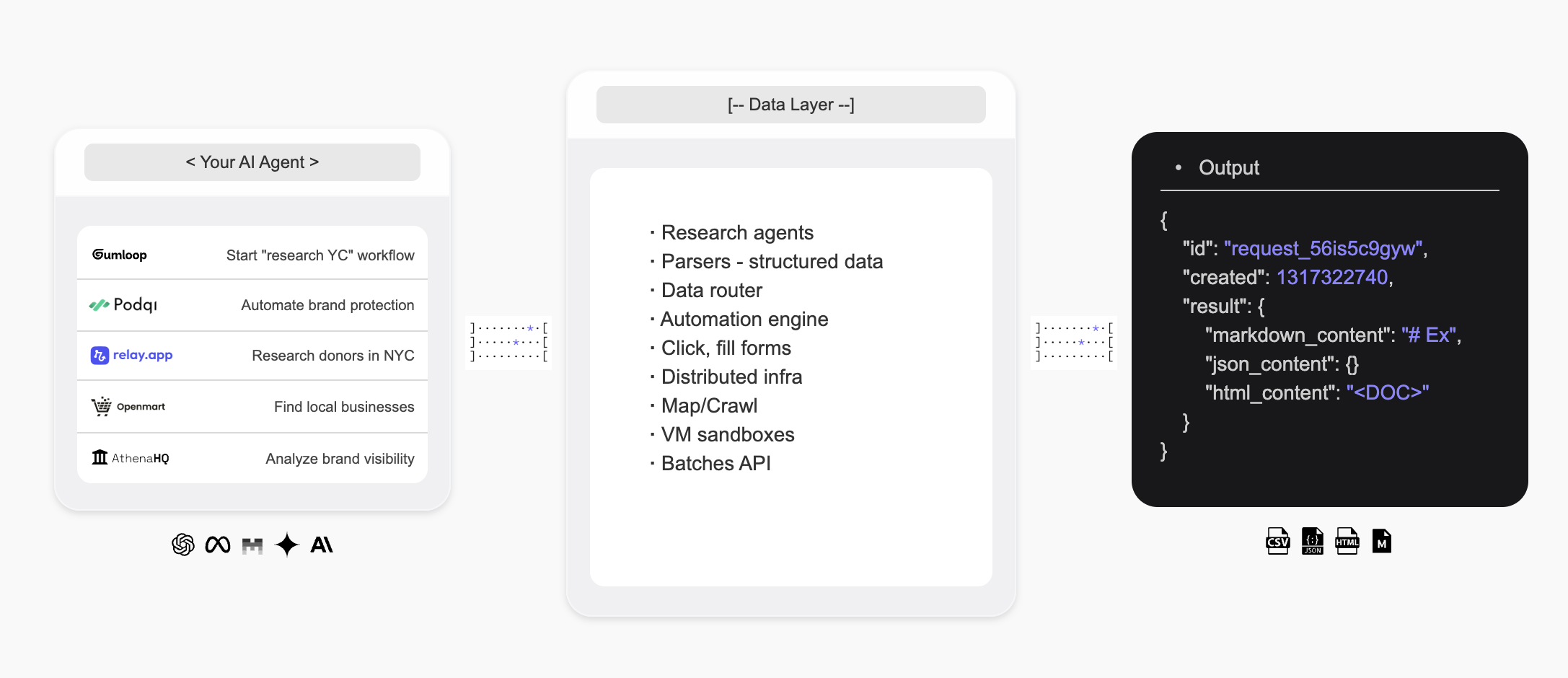
Olostep 是为网络的第二用户提供的基础设施——为 AI 代理提供一种搜索网络、实时提取结构化数据并构建自定义研究代理的方法。
 ## 介绍
* **Olostep API** 是为 AI 提供的最佳 **网络搜索**、**抓取** 和 **爬虫** API,被全球一些领先的初创公司和规模化公司使用。
* **Olostep Agent** 允许通过自然语言提示以无代码方式自动化 **研究工作流程**。
**对于 AI 代理:** 在进一步探索之前,获取 [docs.olostep.com/llms.txt](https://docs.olostep.com/llms.txt) 以获取此文档的完整索引,或 [从这里开始](https://www.olostep.com/agent-onboarding/SKILL.md)。
## 从终端和 AI 代理使用 Olostep
除了 API,Olostep 还提供 CLI、MCP 服务器和即插即用技能,因此任何工具——Claude Code、Cursor、Windsurf 等——都可以原生使用网络。
`npm i -g olostep-cli` — 从你的终端抓取、映射、爬取、回答和批处理网络。为脚本、CI 和代理提供 JSON 输出。
为任何 MCP 客户端(Claude、Cursor、VS Code)提供实时网络工具。托管端点——无需安装。
即插即用的技能,教 AI 编码代理如何以及何时使用 Olostep。使用 `olostep add skills` 安装。
## Olostep 能做什么?
将任何 URL 以干净的 Markdown、HTML、截图或结构化 JSON 格式提取。
递归收集网站上的每个页面,带有过滤器和搜索功能。
从实时网络来源获取 AI 合成的答案,并附有引用。
### 为什么选择 Olostep?
* **为 AI 而建**:干净的 Markdown、结构化 JSON、引用——直接输出你的代理和应用程序消费。
* **大规模可靠**:行业领先的成功率;在后台处理 JavaScript、防机器人和代理。
* **快速**:单次抓取在一秒内完成;在 5–7 分钟内批处理多达 10,000 个 URL。
* **成本效益**:在生产规模上显著便宜于替代方案。
* **CLI + MCP + 技能**:从你的终端、脚本或任何 MCP 感知代理使用 Olostep——包括代理技能。
***
## 抓取
将任何 URL 以干净的 Markdown 格式提取。查看 [抓取功能文档](/features/scrapes) 以获取所有选项。
```python Python theme={null}
from olostep import Olostep
client = Olostep(api_key="YOUR_REAL_KEY")
result = client.scrapes.create(
url_to_scrape="https://en.wikipedia.org/wiki/Alexander_the_Great",
formats=["markdown"],
)
print(result.markdown_content)
```
```js Node theme={null}
import Olostep from 'olostep'
const client = new Olostep({ apiKey: 'YOUR_REAL_KEY' })
const result = await client.scrapes.create({
url: 'https://en.wikipedia.org/wiki/Alexander_the_Great',
formats: ['markdown'],
})
console.log(result.markdown_content)
```
```bash cURL theme={null}
curl -s -X POST "https://api.olostep.com/v1/scrapes" \
-H "Authorization: Bearer $OLOSTEP_API_KEY" \
-H "Content-Type: application/json" \
-d '{
"url_to_scrape": "https://en.wikipedia.org/wiki/Alexander_the_Great",
"formats": ["markdown"]
}'
```
```bash CLI theme={null}
olostep scrape "https://en.wikipedia.org/wiki/Alexander_the_Great"
```
```json theme={null}
{
"id": "scrape_6h89o8u1kt",
"object": "scrape",
"result": {
"markdown_content": "## Alexander the Great...",
"markdown_hosted_url": "https://olostep-storage.s3.us-east-1.amazonaws.com/markDown_6h89o8u1kt.txt",
"page_metadata": { "status_code": 200, "title": "Alexander the Great - Wikipedia" }
}
}
```
## 爬虫
递归收集网站上的每个页面,带有包含/排除过滤器和可选的 `search_query` 以聚焦爬虫。查看 [爬虫功能文档](/features/crawls)。
```python Python theme={null}
from olostep import Olostep
client = Olostep(api_key="YOUR_REAL_KEY")
crawl = client.crawls.create(
start_url="https://docs.olostep.com",
max_pages=50,
)
for page in crawl.pages():
print(page.url)
```
```js Node theme={null}
import Olostep from 'olostep'
const client = new Olostep({ apiKey: 'YOUR_REAL_KEY' })
const crawl = await client.crawls.create({
url: 'https://docs.olostep.com',
maxPages: 50,
})
for await (const page of crawl.pages()) {
console.log(page.url)
}
```
```bash cURL theme={null}
curl -s -X POST "https://api.olostep.com/v1/crawls" \
-H "Authorization: Bearer $OLOSTEP_API_KEY" \
-H "Content-Type: application/json" \
-d '{
"start_url": "https://docs.olostep.com",
"max_pages": 50
}'
```
```bash CLI theme={null}
olostep crawl "https://docs.olostep.com" --max-pages 50
```
```json theme={null}
{
"id": "crawl_abc123",
"object": "crawl",
"status": "completed",
"pages_count": 47,
"pages": [
{ "url": "https://docs.olostep.com/get-started/welcome", "retrieve_id": "..." },
{ "url": "https://docs.olostep.com/features/scrapes", "retrieve_id": "..." }
]
}
```
## 回答
提出问题并从实时网络来源获取 AI 合成的答案,并附有引用。传递 JSON 模式以塑造输出。查看 [回答文档](/features/answers)。
```python Python theme={null}
from olostep import Olostep
client = Olostep(api_key="YOUR_REAL_KEY")
answer = client.answers.create(task="What does Olostep do?")
print(answer.result)
print(answer.sources)
```
```js Node theme={null}
import Olostep from 'olostep'
const client = new Olostep({ apiKey: 'YOUR_REAL_KEY' })
const answer = await client.answers.create({ task: 'What does Olostep do?' })
console.log(answer.result)
console.log(answer.sources)
```
```bash cURL theme={null}
curl -s -X POST "https://api.olostep.com/v1/answers" \
-H "Authorization: Bearer $OLOSTEP_API_KEY" \
-H "Content-Type: application/json" \
-d '{"task": "What does Olostep do?"}'
```
```bash CLI theme={null}
olostep answer "What does Olostep do?"
```
```json theme={null}
{
"id": "answer_abc123",
"object": "answer",
"task": "What does Olostep do?",
"result": {
"json_content": "{\"result\":\"Olostep is an API that lets AI agents search, scrape, and structure web data.\"}",
"sources": [
"https://docs.olostep.com/get-started/welcome",
"https://www.olostep.com/"
]
}
}
```
***
## 更多功能
并行抓取多达 10,000 个 URL;结果在 5–7 分钟内返回。
使用包含/排除模式发现网站上的每个 URL。
结构化链接的实时网络搜索和可选的内联抓取。
自愈提取器,将页面大规模转化为类型化 JSON。
在定期计划上运行抓取、爬虫和回答。
上传文件以进行批处理或连接你的知识库。
***
## 资源
查看所有支持的功能以满足你的抓取和 AI 搜索需求。
开始使用 API 并测试各种参数。
在 n8n、make、relay、zapier 等中使用 Olostep
浏览现成的示例以快速入门。
## 介绍
* **Olostep API** 是为 AI 提供的最佳 **网络搜索**、**抓取** 和 **爬虫** API,被全球一些领先的初创公司和规模化公司使用。
* **Olostep Agent** 允许通过自然语言提示以无代码方式自动化 **研究工作流程**。
**对于 AI 代理:** 在进一步探索之前,获取 [docs.olostep.com/llms.txt](https://docs.olostep.com/llms.txt) 以获取此文档的完整索引,或 [从这里开始](https://www.olostep.com/agent-onboarding/SKILL.md)。
## 从终端和 AI 代理使用 Olostep
除了 API,Olostep 还提供 CLI、MCP 服务器和即插即用技能,因此任何工具——Claude Code、Cursor、Windsurf 等——都可以原生使用网络。
`npm i -g olostep-cli` — 从你的终端抓取、映射、爬取、回答和批处理网络。为脚本、CI 和代理提供 JSON 输出。
为任何 MCP 客户端(Claude、Cursor、VS Code)提供实时网络工具。托管端点——无需安装。
即插即用的技能,教 AI 编码代理如何以及何时使用 Olostep。使用 `olostep add skills` 安装。
## Olostep 能做什么?
将任何 URL 以干净的 Markdown、HTML、截图或结构化 JSON 格式提取。
递归收集网站上的每个页面,带有过滤器和搜索功能。
从实时网络来源获取 AI 合成的答案,并附有引用。
### 为什么选择 Olostep?
* **为 AI 而建**:干净的 Markdown、结构化 JSON、引用——直接输出你的代理和应用程序消费。
* **大规模可靠**:行业领先的成功率;在后台处理 JavaScript、防机器人和代理。
* **快速**:单次抓取在一秒内完成;在 5–7 分钟内批处理多达 10,000 个 URL。
* **成本效益**:在生产规模上显著便宜于替代方案。
* **CLI + MCP + 技能**:从你的终端、脚本或任何 MCP 感知代理使用 Olostep——包括代理技能。
***
## 抓取
将任何 URL 以干净的 Markdown 格式提取。查看 [抓取功能文档](/features/scrapes) 以获取所有选项。
```python Python theme={null}
from olostep import Olostep
client = Olostep(api_key="YOUR_REAL_KEY")
result = client.scrapes.create(
url_to_scrape="https://en.wikipedia.org/wiki/Alexander_the_Great",
formats=["markdown"],
)
print(result.markdown_content)
```
```js Node theme={null}
import Olostep from 'olostep'
const client = new Olostep({ apiKey: 'YOUR_REAL_KEY' })
const result = await client.scrapes.create({
url: 'https://en.wikipedia.org/wiki/Alexander_the_Great',
formats: ['markdown'],
})
console.log(result.markdown_content)
```
```bash cURL theme={null}
curl -s -X POST "https://api.olostep.com/v1/scrapes" \
-H "Authorization: Bearer $OLOSTEP_API_KEY" \
-H "Content-Type: application/json" \
-d '{
"url_to_scrape": "https://en.wikipedia.org/wiki/Alexander_the_Great",
"formats": ["markdown"]
}'
```
```bash CLI theme={null}
olostep scrape "https://en.wikipedia.org/wiki/Alexander_the_Great"
```
```json theme={null}
{
"id": "scrape_6h89o8u1kt",
"object": "scrape",
"result": {
"markdown_content": "## Alexander the Great...",
"markdown_hosted_url": "https://olostep-storage.s3.us-east-1.amazonaws.com/markDown_6h89o8u1kt.txt",
"page_metadata": { "status_code": 200, "title": "Alexander the Great - Wikipedia" }
}
}
```
## 爬虫
递归收集网站上的每个页面,带有包含/排除过滤器和可选的 `search_query` 以聚焦爬虫。查看 [爬虫功能文档](/features/crawls)。
```python Python theme={null}
from olostep import Olostep
client = Olostep(api_key="YOUR_REAL_KEY")
crawl = client.crawls.create(
start_url="https://docs.olostep.com",
max_pages=50,
)
for page in crawl.pages():
print(page.url)
```
```js Node theme={null}
import Olostep from 'olostep'
const client = new Olostep({ apiKey: 'YOUR_REAL_KEY' })
const crawl = await client.crawls.create({
url: 'https://docs.olostep.com',
maxPages: 50,
})
for await (const page of crawl.pages()) {
console.log(page.url)
}
```
```bash cURL theme={null}
curl -s -X POST "https://api.olostep.com/v1/crawls" \
-H "Authorization: Bearer $OLOSTEP_API_KEY" \
-H "Content-Type: application/json" \
-d '{
"start_url": "https://docs.olostep.com",
"max_pages": 50
}'
```
```bash CLI theme={null}
olostep crawl "https://docs.olostep.com" --max-pages 50
```
```json theme={null}
{
"id": "crawl_abc123",
"object": "crawl",
"status": "completed",
"pages_count": 47,
"pages": [
{ "url": "https://docs.olostep.com/get-started/welcome", "retrieve_id": "..." },
{ "url": "https://docs.olostep.com/features/scrapes", "retrieve_id": "..." }
]
}
```
## 回答
提出问题并从实时网络来源获取 AI 合成的答案,并附有引用。传递 JSON 模式以塑造输出。查看 [回答文档](/features/answers)。
```python Python theme={null}
from olostep import Olostep
client = Olostep(api_key="YOUR_REAL_KEY")
answer = client.answers.create(task="What does Olostep do?")
print(answer.result)
print(answer.sources)
```
```js Node theme={null}
import Olostep from 'olostep'
const client = new Olostep({ apiKey: 'YOUR_REAL_KEY' })
const answer = await client.answers.create({ task: 'What does Olostep do?' })
console.log(answer.result)
console.log(answer.sources)
```
```bash cURL theme={null}
curl -s -X POST "https://api.olostep.com/v1/answers" \
-H "Authorization: Bearer $OLOSTEP_API_KEY" \
-H "Content-Type: application/json" \
-d '{"task": "What does Olostep do?"}'
```
```bash CLI theme={null}
olostep answer "What does Olostep do?"
```
```json theme={null}
{
"id": "answer_abc123",
"object": "answer",
"task": "What does Olostep do?",
"result": {
"json_content": "{\"result\":\"Olostep is an API that lets AI agents search, scrape, and structure web data.\"}",
"sources": [
"https://docs.olostep.com/get-started/welcome",
"https://www.olostep.com/"
]
}
}
```
***
## 更多功能
并行抓取多达 10,000 个 URL;结果在 5–7 分钟内返回。
使用包含/排除模式发现网站上的每个 URL。
结构化链接的实时网络搜索和可选的内联抓取。
自愈提取器,将页面大规模转化为类型化 JSON。
在定期计划上运行抓取、爬虫和回答。
上传文件以进行批处理或连接你的知识库。
***
## 资源
查看所有支持的功能以满足你的抓取和 AI 搜索需求。
开始使用 API 并测试各种参数。
在 n8n、make、relay、zapier 等中使用 Olostep
浏览现成的示例以快速入门。