> ## Documentation Index
> Fetch the complete documentation index at: https://docs.olostep.com/llms.txt
> Use this file to discover all available pages before exploring further.
# Olostep + Relay
> 在任何 Relay 工作流中添加网页抓取、AI 驱动的研究、批处理作业、爬虫和站点地图,无需代码。
经过验证的 [Relay 上的 Olostep 应用](https://www.relay.app/apps/olostep/integrations)在 Relay 的可视化构建器中为你提供了两个操作:抓取 URL 或映射站点上的所有链接。
[在 Relay 上查看 →](https://www.relay.app/apps/olostep/integrations)
## 在你开始之前
* **拥有 Olostep 帐户和 API 密钥:** [免费获取](https://olostep.com/dashboard),无需信用卡。你的前 500 个积分已包含在内。
* **拥有 Relay 帐户:** 在 [relay.app](https://www.relay.app/) 创建一个。
* **无需编码:** 本指南中的所有操作均通过 Relay 的可视化编辑器完成。
***
## 设置
打开 Relay 中的一个工作流,添加一个步骤,然后搜索 **Olostep**。从应用列表中选择 **Olostep**。
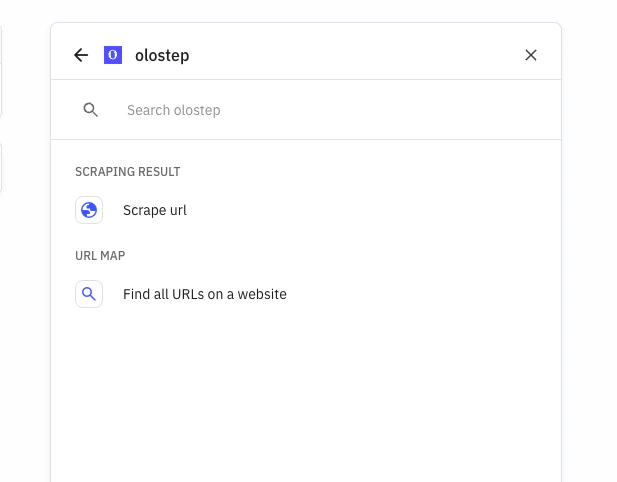
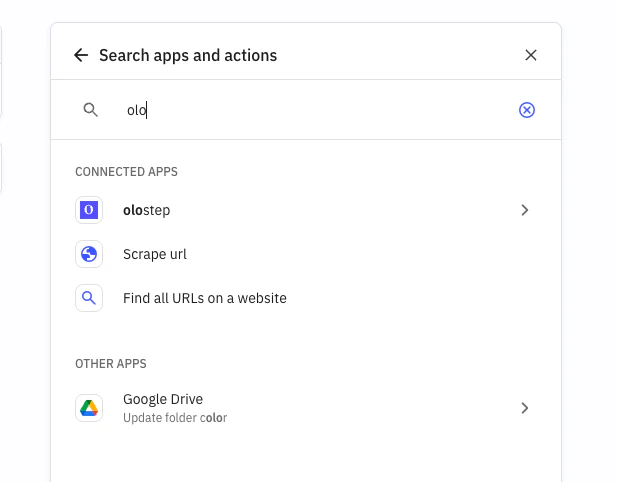 选择 **Olostep** 后,在步骤配置中选择一个可用的 Olostep 操作。
 点击 **连接帐户**,粘贴你的 Olostep API 密钥,并授权连接。Relay 将保存此帐户以供将来的工作流使用。
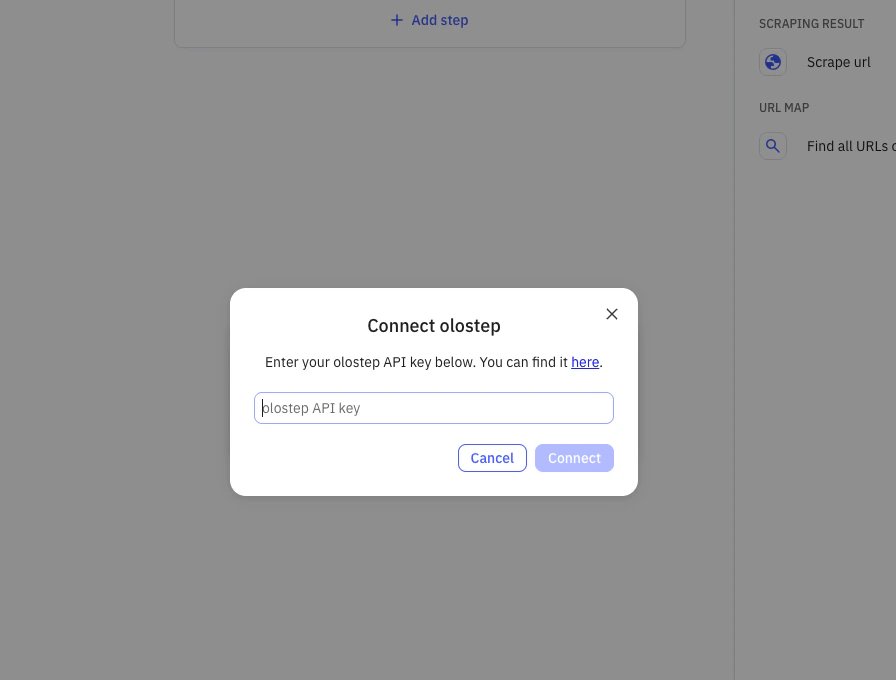 从 [Olostep 仪表板获取你的密钥 →](https://olostep.com/dashboard)
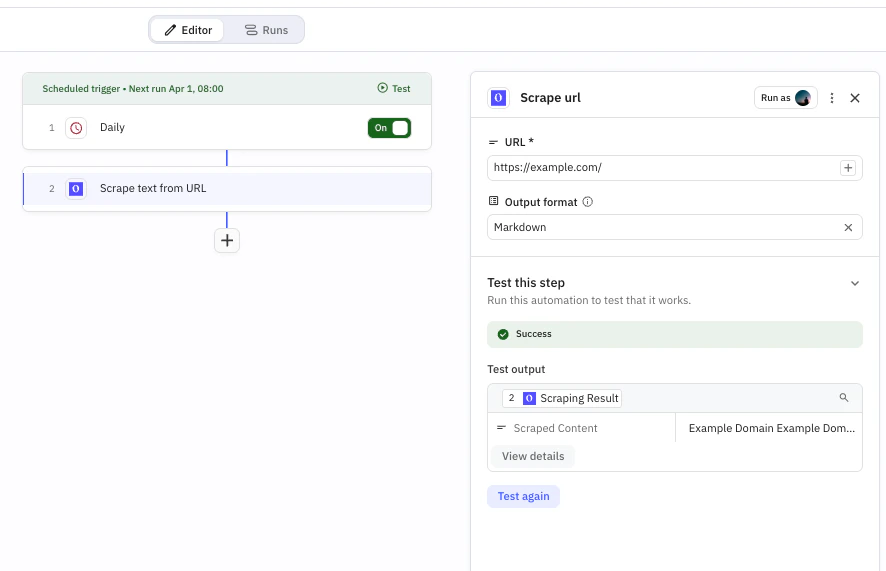
* **要抓取的 URL:** 从上一步映射或手动输入
* **输出格式:** 选择 `Markdown`、`HTML`、`JSON` 或 `Text`
从 [Olostep 仪表板获取你的密钥 →](https://olostep.com/dashboard)
* **要抓取的 URL:** 从上一步映射或手动输入
* **输出格式:** 选择 `Markdown`、`HTML`、`JSON` 或 `Text`
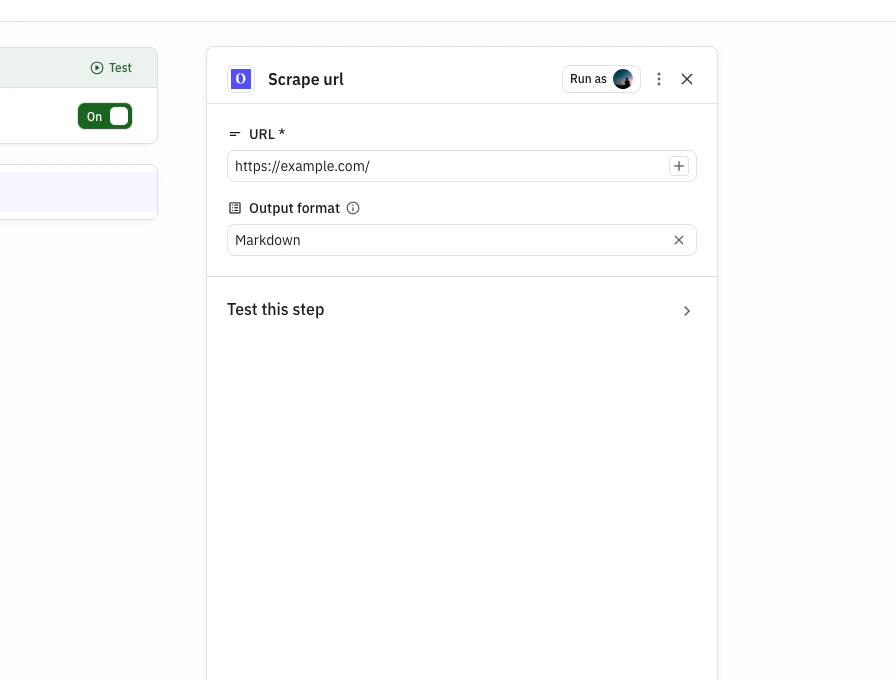 运行测试以验证输出,然后在结果正确时发布或开启工作流。
 ***
## 操作
从任何 URL 提取内容为 Markdown、HTML、JSON 或纯文本。处理 JS 渲染页面,支持可选等待时间和国家定位。
获取站点上的每个 URL,而不抓取内容。在批处理作业之前用于发现。返回一个 `map_id`。
**地图是异步的。** 存储返回的 `map_id`,并在 Relay 中使用延迟/轮询模式在处理完成后检索结果。
***
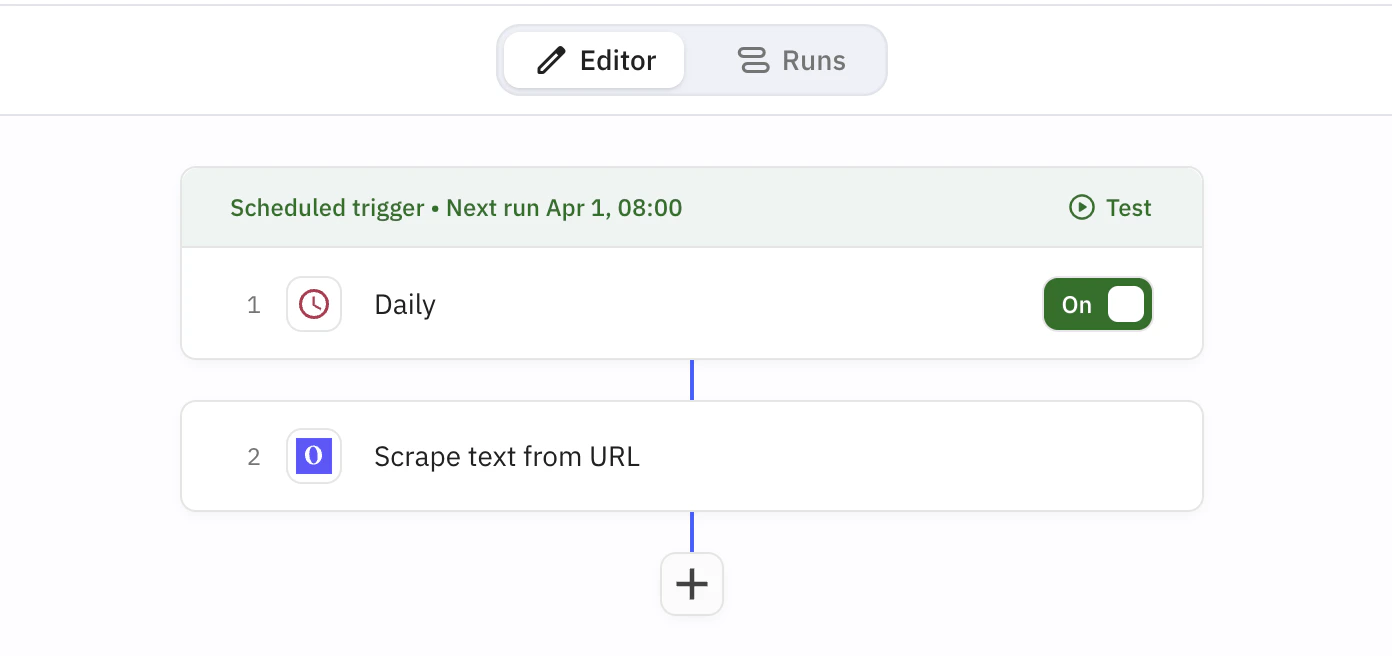
## 示例工作流:定期抓取竞争对手页面
**功能:** 按计划抓取竞争对手页面,并存储可在下游 Relay 步骤中重用的干净内容。
**使用的节点:** Schedule -> Olostep Scrape Website
***
## 操作
从任何 URL 提取内容为 Markdown、HTML、JSON 或纯文本。处理 JS 渲染页面,支持可选等待时间和国家定位。
获取站点上的每个 URL,而不抓取内容。在批处理作业之前用于发现。返回一个 `map_id`。
**地图是异步的。** 存储返回的 `map_id`,并在 Relay 中使用延迟/轮询模式在处理完成后检索结果。
***
## 示例工作流:定期抓取竞争对手页面
**功能:** 按计划抓取竞争对手页面,并存储可在下游 Relay 步骤中重用的干净内容。
**使用的节点:** Schedule -> Olostep Scrape Website
 ***
### 步骤 1:添加计划触发器
创建一个工作流并添加一个计划触发器(例如,每个工作日上午 8 点)。
### 步骤 2:添加 Olostep 抓取网站
添加一个 **Olostep** 步骤并选择 **抓取网站**。设置:
* **URL:** `https://competitor.com/blog`
* **输出格式:** Markdown
### 步骤 3:测试和发布
运行测试以确认输出,然后发布或开启工作流。
### 你将获得
每次运行都会产生准备好进行分析或路由的干净页面内容:
> **抓取结果**
>
> * 来源 URL
> * 以你选择的格式检索的内容
> * 在 Relay 中带有时间戳的运行输出
***
## 解析器
在抓取操作的 **解析器** 字段中添加解析器 ID,以获取结构化数据而非原始内容:
| 解析器 | 提取内容 |
| ---------------------------- | --------------------------- |
| `@olostep/amazon-product` | 标题、价格、评分、评论、图片、变体 |
| `@olostep/google-search` | 结果标题、URL、摘要 |
| `@olostep/google-maps` | 商家名称、地址、评分、评论 |
| `@olostep/extract-emails` | 从任何页面提取电子邮件地址 |
| `@olostep/extract-socials` | 社交资料链接(X、GitHub、LinkedIn 等) |
| `@olostep/extract-calendars` | Google 日历和 ICS 链接 |
在 [Olostep 解析器商店](https://www.olostep.com/store) 查看完整列表 →
***
## Relay.app 与 Zapier
对于需要内置审查和 AI 优先编排的工作流,Relay.app 是 Zapier 的强大替代方案。
**Relay.app 的优势:**
* **人机协作:** 工作流中的原生审批和审查步骤
* **AI 优先的工作流设计:** 更容易将 AI 决策和摘要作为一流步骤添加
* **工作流清晰度:** 干净的可视化构建器,具有清晰的运行上下文和步骤输出
**何时 Zapier 可能更好:**
* 你需要 Zapier 上提供的特定应用的覆盖
* 你的团队已经在 Zapier 上有许多现有的 Zaps 和操作工具
如果两个平台都支持你的技术栈,当审查和 AI 协作是你流程的核心时,选择 Relay。
***
## 故障排除
直接从 [olostep.com/dashboard](https://olostep.com/dashboard) 复制密钥,确保没有尾随空格。如果错误仍然存在,请在 Relay 中重新连接 Olostep 帐户。
增加 **抓取前等待时间**(对于 JS 密集型页面,尝试 2000–5000ms)。确认 URL 可以在无需登录的情况下公开访问。如果某个域名持续失败,请联系 [info@olostep.com](mailto:info@olostep.com)。
在抓取密集型运行之间添加延迟,并在大型工作流中使用退避重试。检查 [仪表板](https://olostep.com/dashboard) 中的当前使用情况。
地图是异步的。首先存储返回的 `map_id`,然后在处理完成后在稍后的步骤/运行中获取结果。
***
## 相关内容
抓取端点的完整参考
批处理作业的工作原理及如何检索结果
爬虫配置和结果检索
URL 发现和过滤选项
***
### 步骤 1:添加计划触发器
创建一个工作流并添加一个计划触发器(例如,每个工作日上午 8 点)。
### 步骤 2:添加 Olostep 抓取网站
添加一个 **Olostep** 步骤并选择 **抓取网站**。设置:
* **URL:** `https://competitor.com/blog`
* **输出格式:** Markdown
### 步骤 3:测试和发布
运行测试以确认输出,然后发布或开启工作流。
### 你将获得
每次运行都会产生准备好进行分析或路由的干净页面内容:
> **抓取结果**
>
> * 来源 URL
> * 以你选择的格式检索的内容
> * 在 Relay 中带有时间戳的运行输出
***
## 解析器
在抓取操作的 **解析器** 字段中添加解析器 ID,以获取结构化数据而非原始内容:
| 解析器 | 提取内容 |
| ---------------------------- | --------------------------- |
| `@olostep/amazon-product` | 标题、价格、评分、评论、图片、变体 |
| `@olostep/google-search` | 结果标题、URL、摘要 |
| `@olostep/google-maps` | 商家名称、地址、评分、评论 |
| `@olostep/extract-emails` | 从任何页面提取电子邮件地址 |
| `@olostep/extract-socials` | 社交资料链接(X、GitHub、LinkedIn 等) |
| `@olostep/extract-calendars` | Google 日历和 ICS 链接 |
在 [Olostep 解析器商店](https://www.olostep.com/store) 查看完整列表 →
***
## Relay.app 与 Zapier
对于需要内置审查和 AI 优先编排的工作流,Relay.app 是 Zapier 的强大替代方案。
**Relay.app 的优势:**
* **人机协作:** 工作流中的原生审批和审查步骤
* **AI 优先的工作流设计:** 更容易将 AI 决策和摘要作为一流步骤添加
* **工作流清晰度:** 干净的可视化构建器,具有清晰的运行上下文和步骤输出
**何时 Zapier 可能更好:**
* 你需要 Zapier 上提供的特定应用的覆盖
* 你的团队已经在 Zapier 上有许多现有的 Zaps 和操作工具
如果两个平台都支持你的技术栈,当审查和 AI 协作是你流程的核心时,选择 Relay。
***
## 故障排除
直接从 [olostep.com/dashboard](https://olostep.com/dashboard) 复制密钥,确保没有尾随空格。如果错误仍然存在,请在 Relay 中重新连接 Olostep 帐户。
增加 **抓取前等待时间**(对于 JS 密集型页面,尝试 2000–5000ms)。确认 URL 可以在无需登录的情况下公开访问。如果某个域名持续失败,请联系 [info@olostep.com](mailto:info@olostep.com)。
在抓取密集型运行之间添加延迟,并在大型工作流中使用退避重试。检查 [仪表板](https://olostep.com/dashboard) 中的当前使用情况。
地图是异步的。首先存储返回的 `map_id`,然后在处理完成后在稍后的步骤/运行中获取结果。
***
## 相关内容
抓取端点的完整参考
批处理作业的工作原理及如何检索结果
爬虫配置和结果检索
URL 发现和过滤选项